

You’ve got a dozen SEO audit tools glaring at you from open tabs. Every one promises to be the ultimate fix, each flaunting 100+ features you’ll probably never touch. Meanwhile, your inbox is a battlefield: one expert swears by Screaming Frog, another waves the Semrush flag, and someone else insists you’re doomed without Ahrefs.
Here’s the bit they skip: experienced SEO professionals don’t cling to one platform. They’re not dazzled by endless features or swayed by all-in-one hype. What they’ve built instead is far simpler and far more effective. Smart, minimal tool stacks that actually deliver.
So, let’s explore the system that ditches analysis paralysis, sharpens your decisions, and keeps you from buying tools you’ll never actually use. Let’s get into it.
The best three-layer SEO audit system
Most SEO tool comparisons set you up to fail. They throw 15 platforms into a spreadsheet, line up 200+ features, and crown a winner based on who ticks the most boxes – often leaving you more lost than when you started.
Here’s why traditional comparisons miss the mark:
- They treat all features as equal, when something like XML sitemap detection isn’t remotely as critical as JavaScript rendering analysis.
- They assume you need one tool that does everything, even though in some areas, specialized software might outperform all-in-one platforms.
- They ignore workflow reality – you don’t crawl your whole site daily, so why pay for a tool designed as if you do?
The real edge comes from building a three-layer system that mirrors how SEO work actually happens:
Layer 1: Continuous monitoring – your day-to-day safety net for things like broken pages, missing meta descriptions, or sudden ranking drops. This layer spots problems before they spread.
Layer 2: Periodic deep crawls – monthly or quarterly sweeps into your site’s structure. Redirect chains, orphaned pages, Core Web Vitals – the heavy technical work you don’t need to repeat every week.
Layer 3: Competitive intelligence – project-driven research when you’re creating new content or defending rankings. Which keywords are competitors grabbing? Which backlinks are you missing?
Layer 1: continuous monitoring tools (every site needs this)
Start with free SEO tools that actually matter
For free SEO monitoring, nothing beats Google Search Console. It’s the essential baseline every site needs, because it shows exactly how Google views your pages.
Why GSC is non-negotiable:
- Offers real search data, including queries, clicks, countries, and devices, direct from Google.
- Shares index coverage and crawl reports highlighting what Google can or can’t reach.
- Tracks Core Web Vitals measured from actual users, not lab tests.
- Is the only definitive view of what Google sees, indexes, and ranks.
Other free tools still earn a place. PageSpeed Insights offers Core Web Vitals checks with fix recommendations, while Lighthouse integrates performance tests into dev workflows. And don’t overlook Bing Webmaster Tools, especially as Bing gains traction through AI integrations.
The WordPress monitoring solution: SEOPress’s 52-point audit + GSC integration
GSC shows what Google sees, but it misses on-page issues: broken links, duplicate titles, thin content, and missing meta. SEOPress PRO fills this gap with 52 checks inside WordPress, and its GSC integration takes it further, overlaying traffic data on each flagged issue so you instantly know what matters.
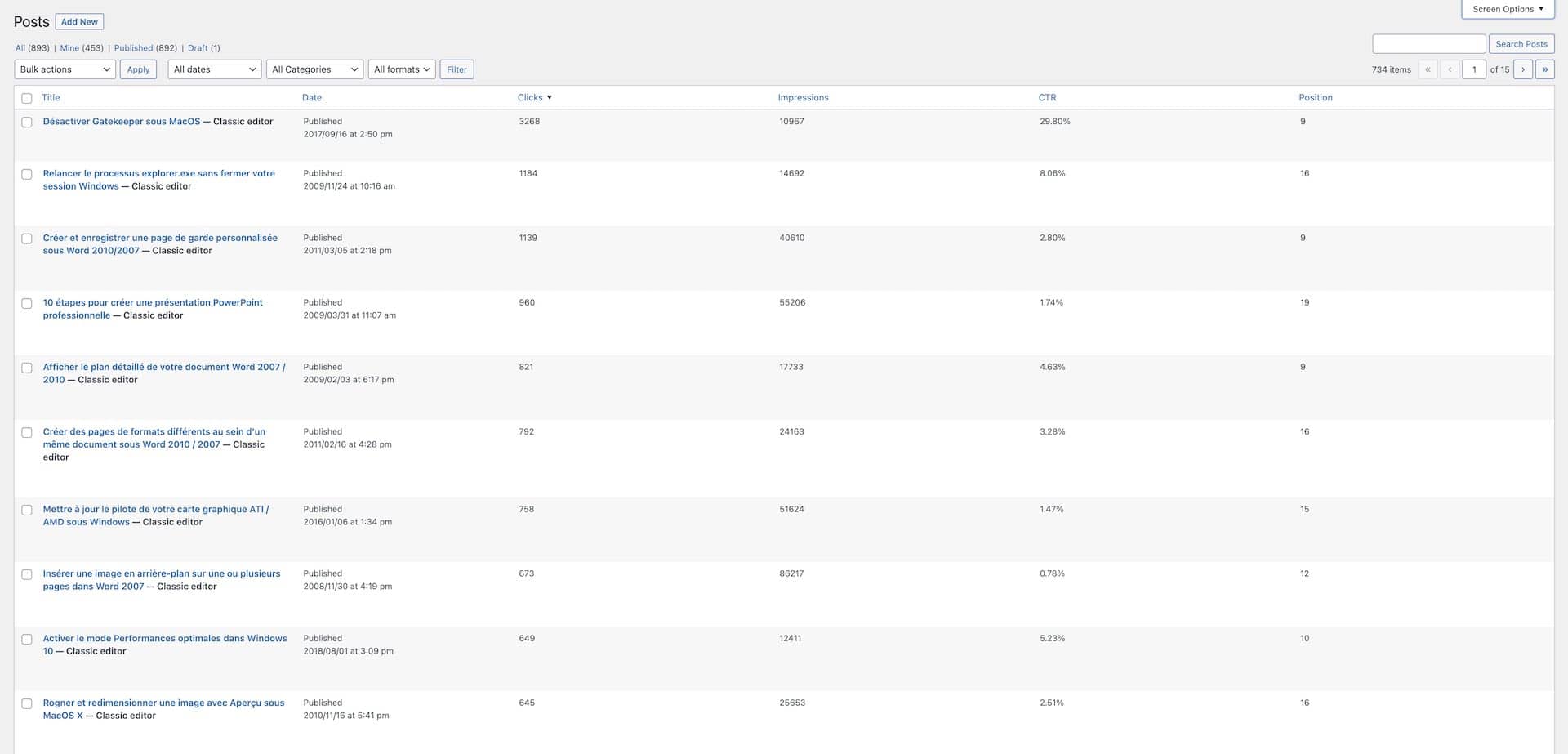
The difference is huge.
- Without SEOPress integration, your workflow is something like: Find an error in GSC → switch tabs → track down the page → cross-reference → maybe fix it.
- With SEOPress PRO, you can: See the issue with traffic data → click edit → fix it on the spot.
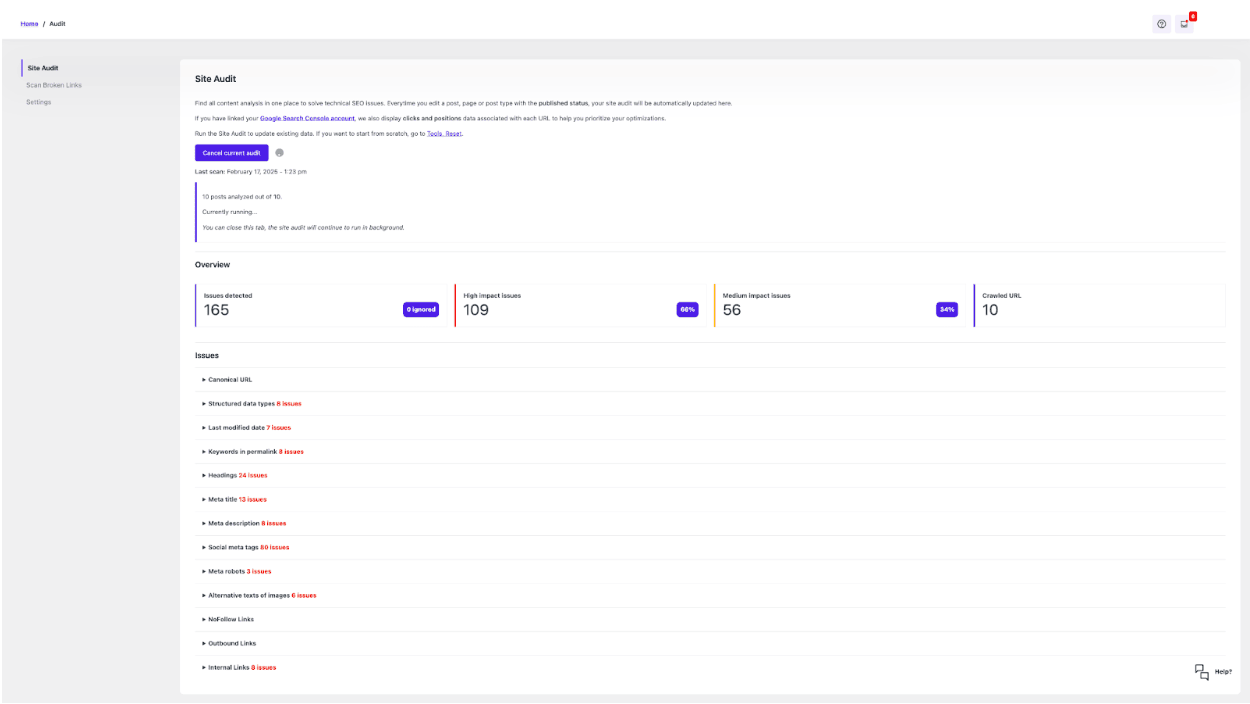
As one SEOPress PRO user put it:
“Simply put, SEOPress is a joy to set up and to use, both on my own and clients’ websites. The recent (v8.2) addition of the Site Audit features has made it even better… I especially like the integration with Google Search Console and Lighthouse, which makes it much more convenient when improving a site (and even to know which parts to focus on) than having to go back and forth between tabs for each post.” – @jrmyfranck
Even extras like its AI alt text generator add real value, bulk-creating context-relevant descriptions in seconds. That kind of automation saves hours each week, enabling you to stay focused on increasing your rankings.
Layer 2: deep technical crawling tools
When monitoring keeps surfacing recurring problems or your site grows past a few hundred pages, it’s time for a heavyweight crawler. Screaming Frog has been the go-to choice for serious SEO experts for more than a decade. The free version’s 500-URL crawl limit is enough for many small sites, but the real strength lies in its depth. Desktop crawlers like Screaming Frog expose issues that lighter tools miss, such as:
- Redirect chains draining crawl budget.
- Orphaned pages hidden from users and Google.
- JavaScript rendering gaps.
- Inconsistent response times across your architecture.
You know it’s time for Layer 2 when:
- Layer 1 monitoring keeps flagging issues you can’t diagnose.
- Your site passes 500 pages or leans heavily on JavaScript.
- A client presses for answers on rankings, and quick fixes won’t suffice.
Layer 3: competitive intelligence tools
The key question here is simple: “Are you just fixing your own site, or are you actively working to beat competitors?” If your focus is purely on technical fixes and polishing existing content, Layers 1 and 2 will cover you. But once you want to know why competitors outrank you, or identify opportunities they’ve missed, you need competitive intelligence.
Ahrefs is the go-to for this. It uncovers insights you’ll never find internally, including:
- Content gaps – keywords competitors rank for but you don’t.
- Link gaps – sites linking to them but not you.
- Keyword opportunities – valuable, low-competition terms your rivals have overlooked.
This layer is crucial when shaping content strategy, not just fixing issues. Launching a content hub? Responding to an aggressive competitor? Pitching SEO potential to a client? In these moments, competitive data shifts from optional to indispensable.

A smart way to use Ahrefs: treat it as a rental. Instead of locking into an annual plan, take the Lite Plan at $99 for one month each quarter. Run your analysis, export the data, cancel, and come back three months later. You’ll cut costs to allow savings you can put towards other tools.
Once your internal improvements level off, competitive intelligence shows what you should target next. That’s how you move from defense, i.e., fixing your site, to offense, i.e., winning new ground.
Implementing your three-layer system
Building an audit system is about adding the right layers as your needs grow. Here’s the progression that works:
| Layer | Months | Layer and tools | Focus areas | When to level up | Success metric | Cost |
| Layer 1: monitoring | Months 1-3 | • Google Search Console • SEOPress Site Audit | • 404 errors sending visitors to dead ends • Missing title/meta descriptions • Duplicate content confusing search engines | • Site exceeds 500 pages (beyond free tool limits) • Recurring issues you can’t diagnose • Stakeholders need clear answers on rankings | Clean baseline with zero critical errors | $0-49/year |
| Layer 2: deep crawling | Months 3-6 | • Screaming Frog (Start monthly to spot patterns, then quarterly) | • Redirect chains • Orphaned pages • JavaScript rendering • Site architecture | • Expanding content strategy, not just fixing pages • Running link-building campaigns that need target data • Pitching clients or defending budgets with market evidence | Technical issues identified and prioritized | +$0 (free under 500 URLs) +$279/year (unlimited) |
| Layer 3: competitive intel | As needed | • Ahrefs (rent monthly/quarterly) | • Content gaps • Link opportunities • Keyword research • Competitor analysis | When strategy demands external data | Competitor opportunities identified for capture | +$99/month* |
Implementation by business model
DIY site owners: Layer 1 is often enough. Many successful sites never need more than GSC plus basic monitoring.
Freelancers: Build on Layer 1, add Layer 2 for client audits, and rent Layer 3 per project when competitive analysis is required.
Agencies: All three layers are worth it, with annual Ahrefs subscriptions paying off across multiple clients.
In-house SEOs: Use the full stack daily, with each layer feeding into a cohesive strategy.
The strength of this system is simple: you only invest in extra complexity when it pays you back.
Your SEO audit system starts today
Remember those 10+ tools and 50 conflicting opinions? They’re still out there, piling on tabs and promises. But you’ve now got something sharper: a system designed to scale with you instead of drowning you in features you’ll never use.
For WordPress, the route is simple: start with Google Search Console (free, essential) and SEOPress Site Audit. Together, they bring Google’s data straight into your workflow, minus the tab juggling and messy spreadsheets.
Don’t overcomplicate things. You don’t need every layer now, and maybe not ever. Begin with continuous monitoring to spot issues early, add deep crawling when you reach its ceiling, and only bring in competitive intel when the strategy calls for it. The best audit system is ultimately the one you’ll actually use.


