

SEOPress 10.3 is now available. We encourage you to update your site as soon as possible to take advantage of the latest features, improvements, and fixes.
🎉 New – Manage your SEO from Claude, ChatGPT or Cursor
What if you could simply ask your AI assistant to fix your SEO? SEOPress 10.3 includes a built-in MCP server. MCP (Model Context Protocol) is the open standard AI assistants use to work with external tools. Connect your site once, and your assistant can read and update your SEO data straight from a conversation.
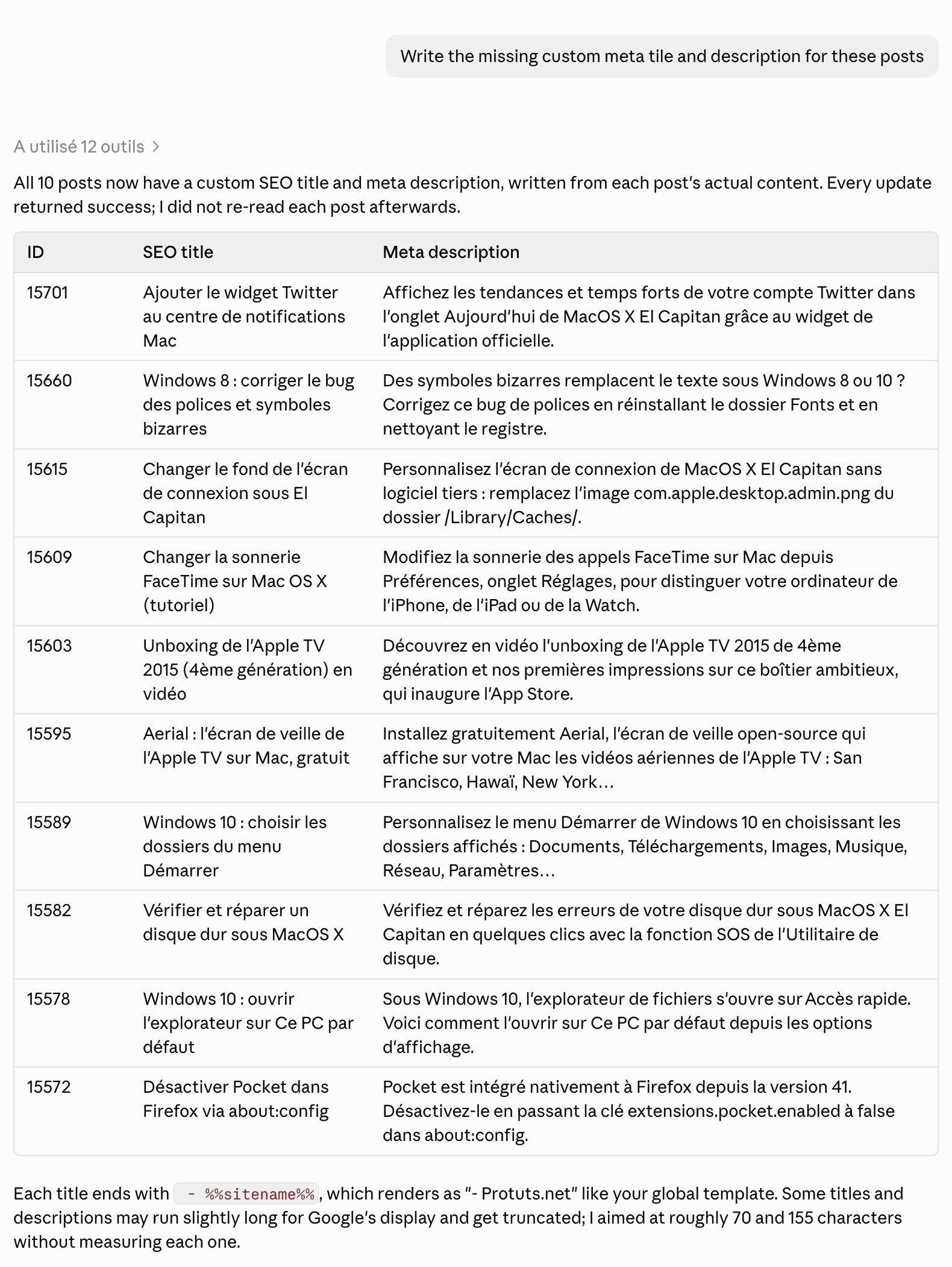
Here is what you can ask:
- “List the pages with no meta description and write one for each of them.”
- “Which posts are set to noindex? Tell me if any of them looks like a mistake.”
- “Run the content analysis on this post and tell me what to fix.”
- “Create a 301 redirection from /old-page/ to /new-page/.” (PRO)
- “Run the technical audit of my site and sum up the issues by priority.” (PRO)
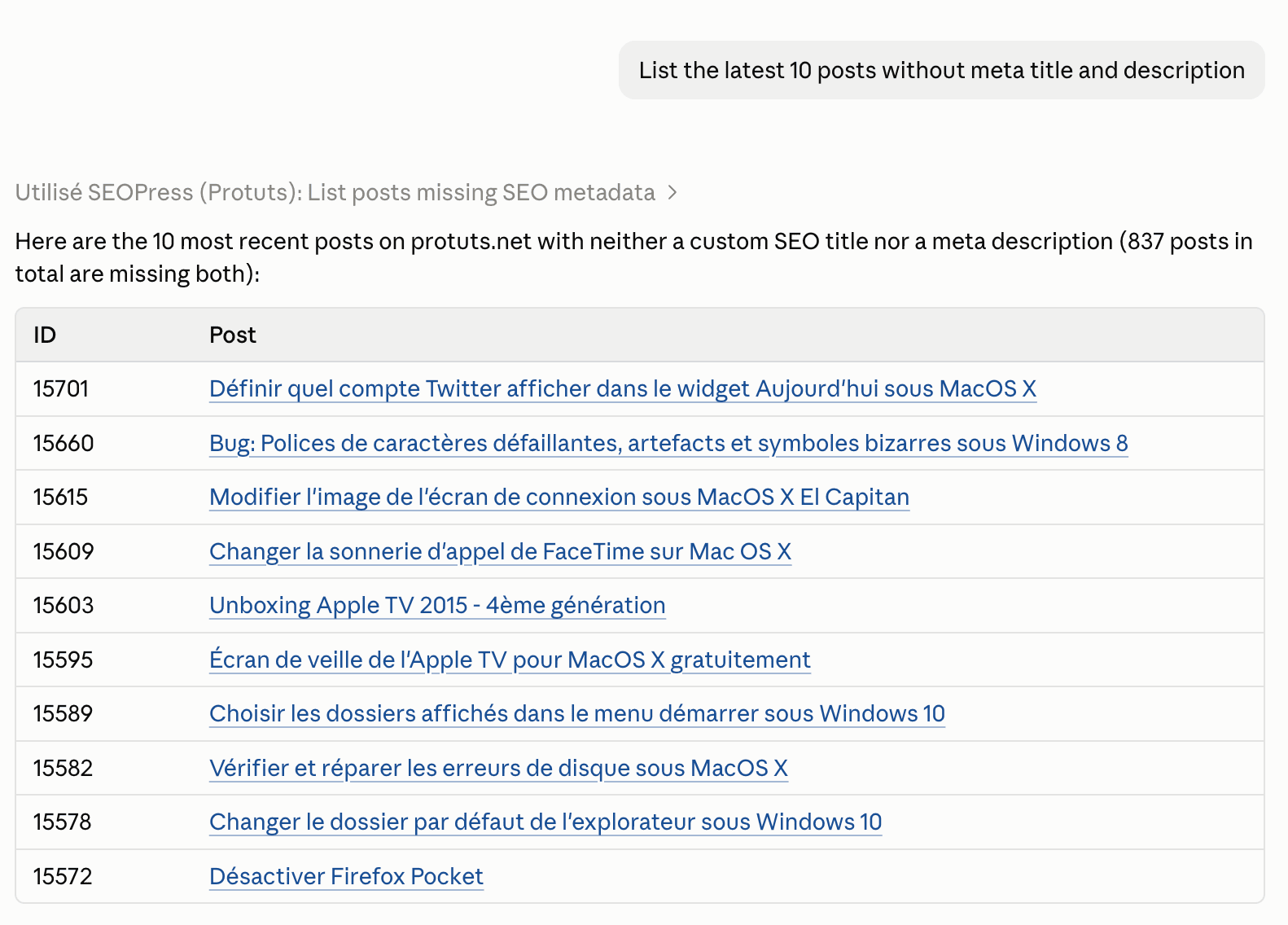
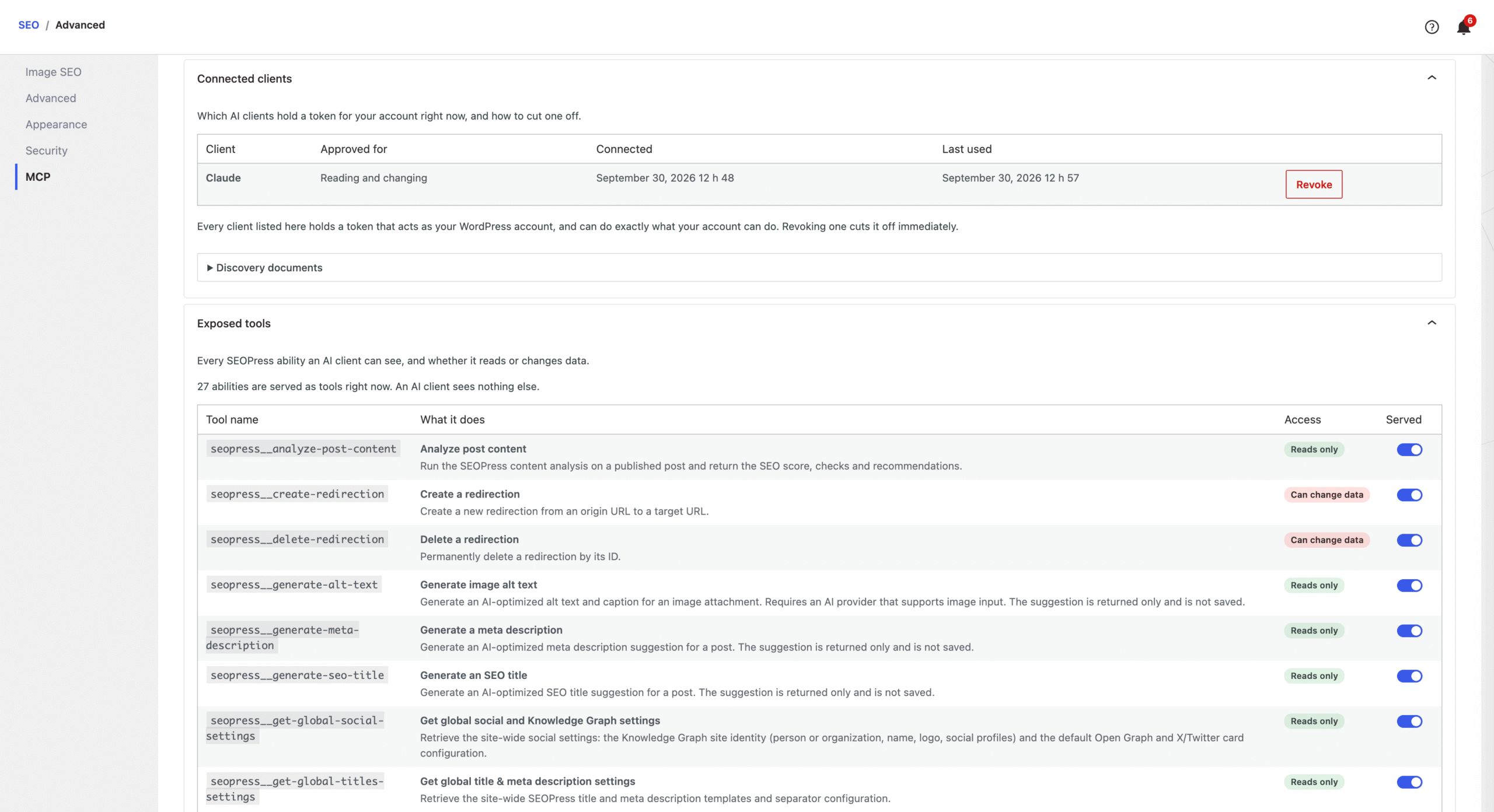
SEOPress Free comes with 14 tools: titles and meta descriptions, robots settings, social metadata, content analysis and site-wide reports. SEOPress PRO adds 13 more for redirections, schemas, target keywords, AI generation and the technical audit.
Setup takes a minute. Turn the feature on in SEO, Advanced, open the new MCP tab and paste your server URL into Claude, ChatGPT or Cursor. You sign in to your own site and approve the connection. There is no extra plugin to install, no API key to create and no third-party service in between.
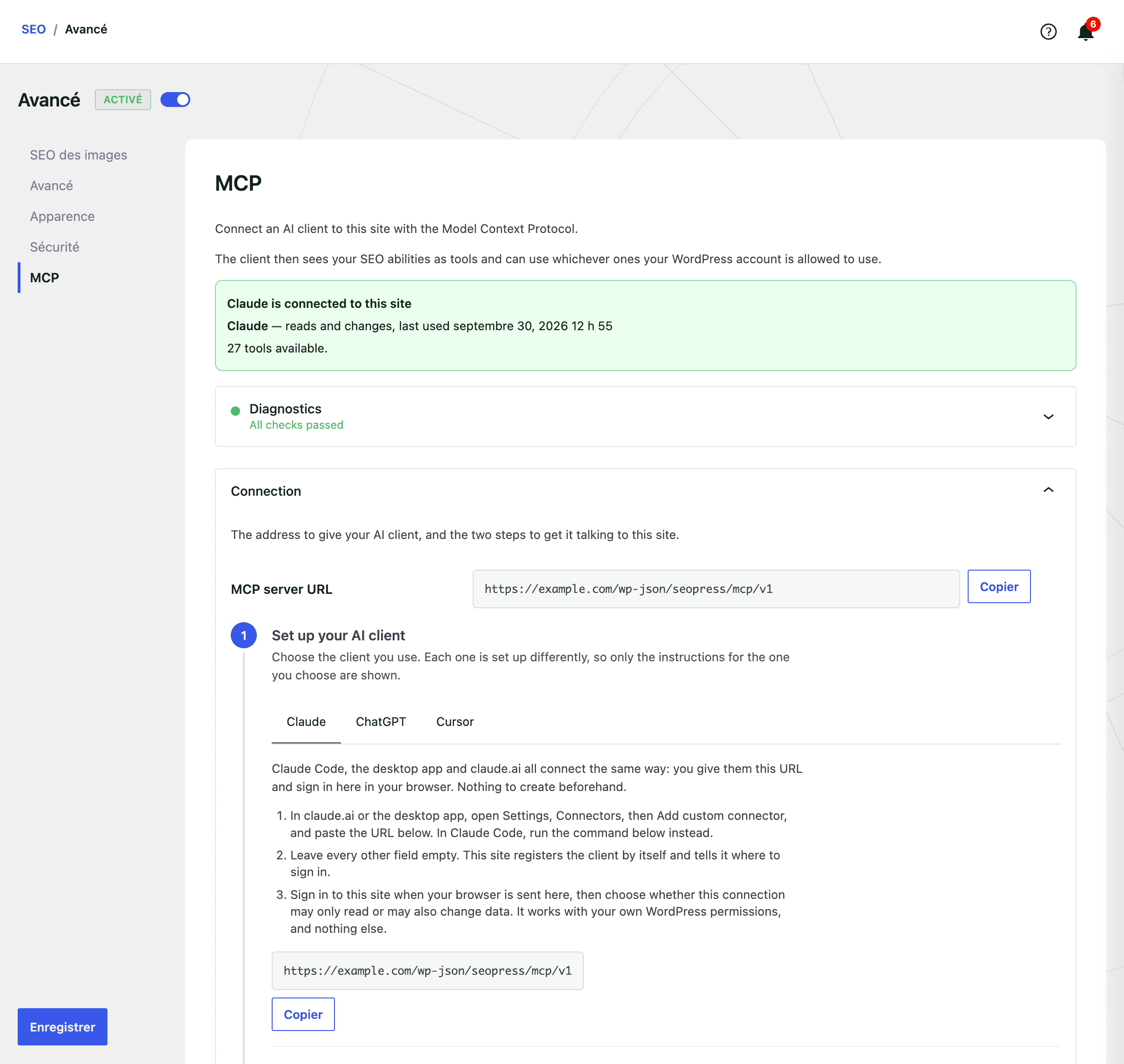
You stay in control:
- Off by default: nothing is exposed until you turn it on
- Your permissions, never more: the assistant can only do what your WordPress account is allowed to do
- Read-only mode: approve a connection that can look at your data but never change it
- Tool by tool: switch off any tool you prefer to keep to yourself
- Revocable: cut a client off in one click, at any time
Read our guide to connect your AI assistant to SEOPress.
🎉 New – A cookie banner that works with your cache plugin
Cache plugins like WP Rocket, LiteSpeed Cache or W3 Total Cache save one copy of each page and show it to every visitor. Until now, the saved copy could keep the consent choice of whichever visitor loaded the page first. Visitors who had not answered the banner might get tracked anyway. Visitors who had accepted might not be tracked on the next page.
SEOPress 10.3 fixes this. Every visitor now gets the same cached page, and their own browser applies their consent choice. Google Analytics, Matomo and Microsoft Clarity start only for visitors who said yes. Visitors who accepted no longer slow your server down on each page view.
We also fixed the full-width banner, which could overflow the screen on mobile.
🎉 New – Schemas that tell Google who you are
Your site publishes several schemas: your Organization (or Person), your WebSite, and sometimes a Service or a Local Business. Until now, each one stood alone. SEOPress 10.3 gives them stable IDs and links them together. Your WebSite schema now names your Organization as its publisher, so Google can clearly see who is behind your site.
SEOPress PRO goes further:
- Service schema: link the service provider to your site’s Organization in one click, instead of typing its details again (PRO)
- Book schema: a new schema for books, with ISBN, author, edition, format, pages and price, plus a ready-to-use template for book catalogs (PRO)
- Local Business schema: add an optional email address, logo and social profiles (PRO)
- Video schema: add your own YouTube API key to fill in video details automatically, without slowing down your pages (PRO)
To write your own JSON-LD, check the new list of dynamic variables. It includes dates in the format Google expects.
🎉 New – Your Search Console data, where you need it (PRO)
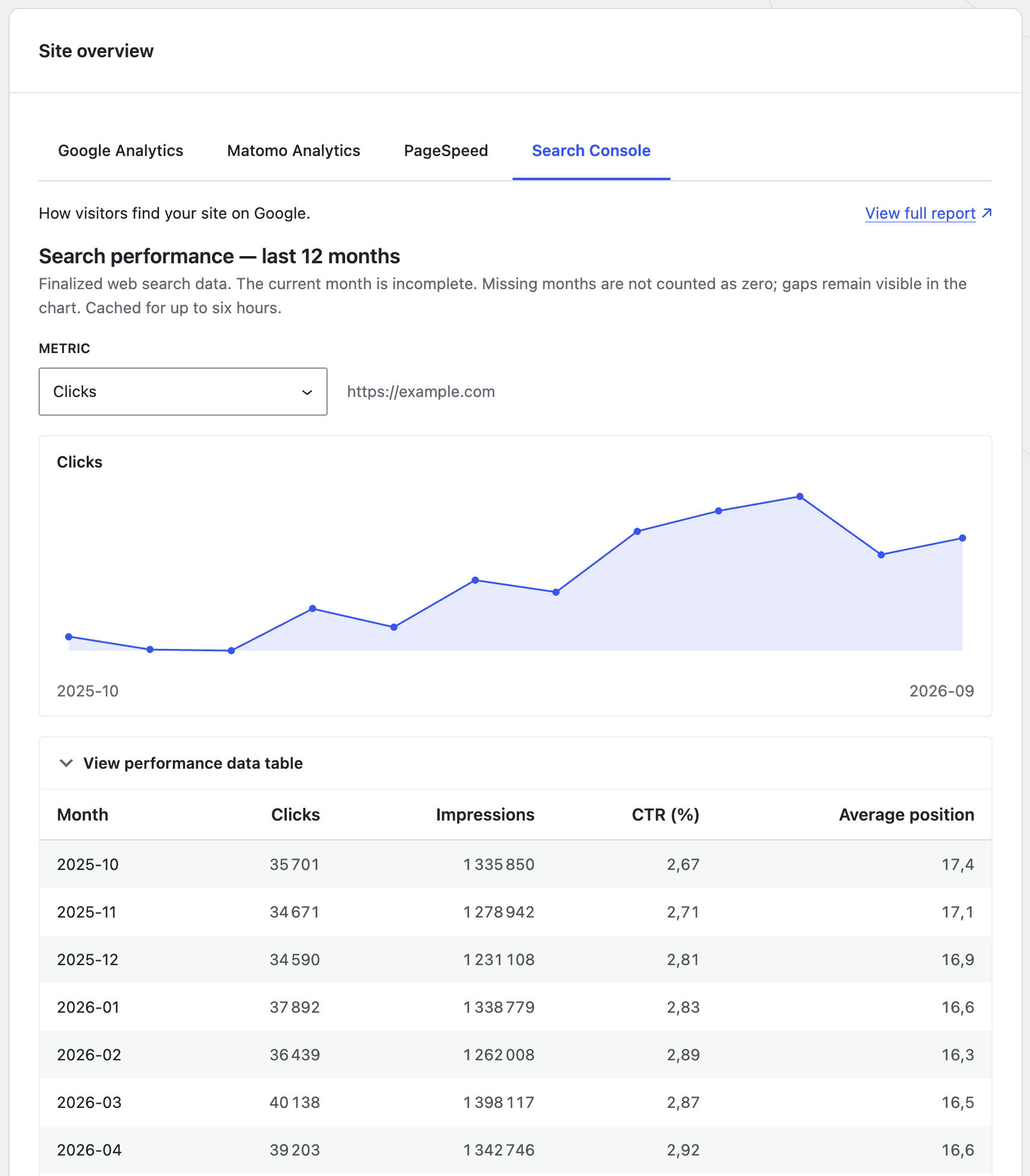
A single number rarely tells the whole story. The SEOPress dashboard now shows a 12-month chart of your Search Console performance. Switch between clicks, impressions, CTR and average position to see how your site is trending.
You’ll also find Search Console data in two more places:
- In the SEO metabox: the clicks, impressions, CTR and position of the post you are editing, right in the URL inspection tab
- In your post lists: a new column shows the last saved Google indexing status of each post, with a link to the full report
These numbers come from your last sync, so opening a list or a post never uses up your Google API quota.
🎉 New – Redirections that look out for you (PRO)
Have you ever published a page and wondered why nobody could see it? The URL was already redirected somewhere else. SEOPress 10.3 now shows a warning in the editor as soon as the URL you are about to publish is covered by an active redirection. This works in the block editor and the Classic Editor, even for new drafts.
410 (Gone) and 451 (Unavailable for legal reasons) rules now show your theme’s error page instead of a blank page. Your visitors see a familiar page, and search engines still get the right status code.
Large redirection imports now run in batches, so a big CSV file no longer fails halfway through. Regex rules also match more reliably, including URLs with a trailing slash, query parameters, and WPML or Weglot language prefixes.
🎉 New – More Google Analytics 4 options
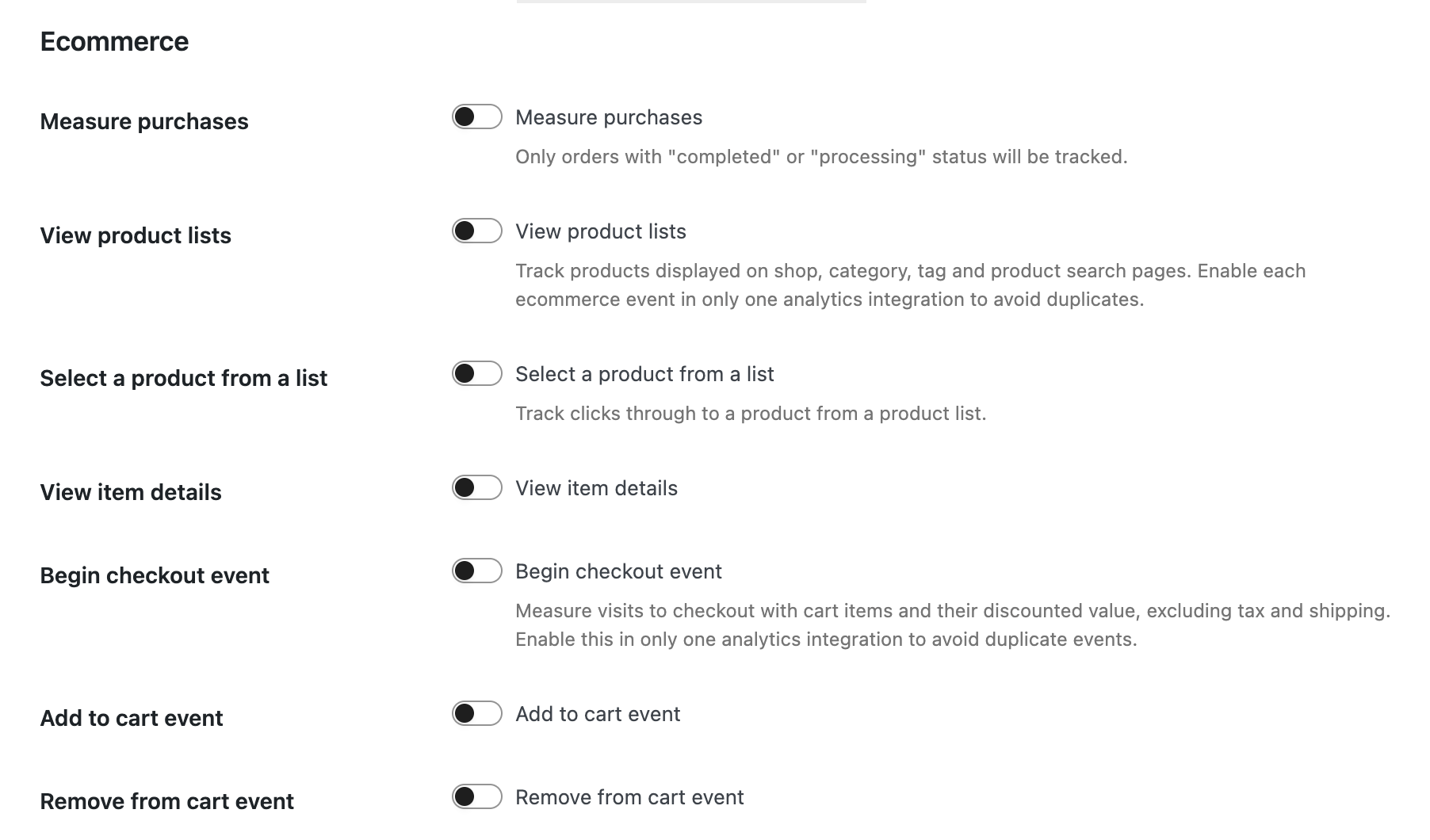
Google Analytics 4 gets several new optional settings, all turned off by default:
- Cross-domain tracking: follow a visitor across several of your websites as a single visit
- 404 tracking: see which broken URLs your visitors land on, without counting extra page views
- WooCommerce checkout starts: know how many shoppers start paying (PRO)
- WooCommerce product lists: measure which products are seen and clicked in your shop and category pages (PRO)
If you had trouble connecting Google Analytics since 10.2, this is fixed, and SEOPress now explains why a sync fails (PRO).
🎉 New – Google preferred sources, now in one click
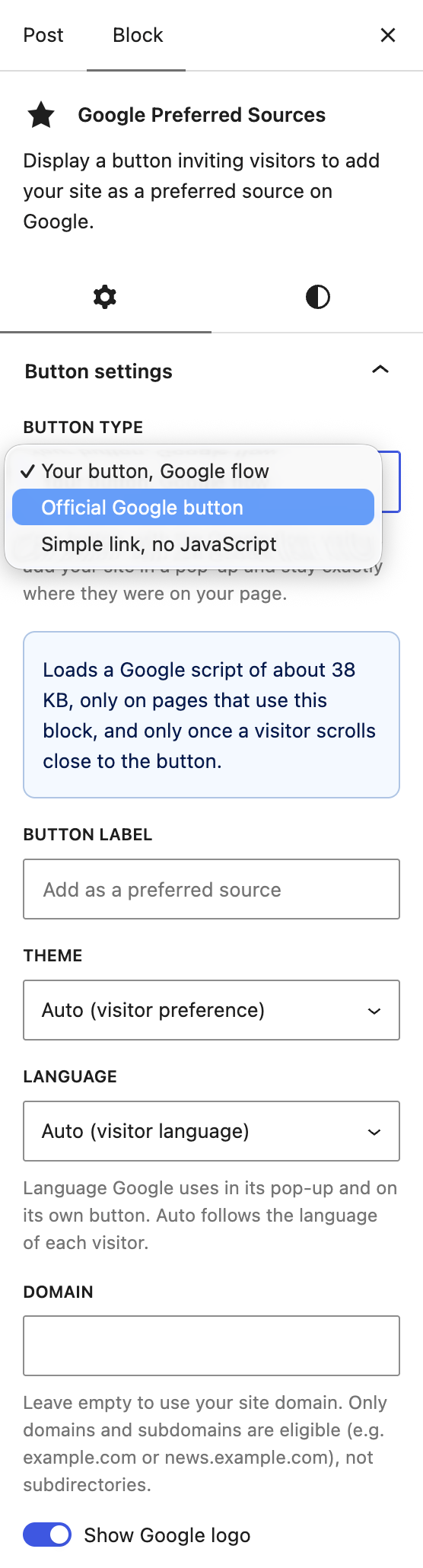
Google lets readers choose their preferred news sources. The SEOPress “Preferred source” button now opens Google’s flow in a popup. Readers confirm and stay on your page, instead of being sent to Google.
New blocks use this mode automatically. The buttons you already added keep working exactly as before, and you can switch them to the new mode at any time.
🎉 A faster, more reliable SEO metabox
We rebuilt the SEO metabox with the native WordPress components. It keeps the layout you know, and it loads faster. Your edits are saved more reliably too, including values like “0” and fields you empty or change back.
🎉 Other enhancements and fixes
New:
- AI: Claude Sonnet 5 is now available (PRO)
- WP-CLI: run a content analysis on all your posts in one command, handy after switching from another SEO plugin (PRO)
- Tools: a new check for your IndexNow key file, and fewer false alerts on the XML sitemap check
- Developers: new filters to disable the bulk actions, keep the canonical URL on noindexed pages, and change the priority of your custom tracking code
Improved:
- Pages are now shared on social networks as “website” instead of “article”
- Schemas and Search Console now use your site address, not the WordPress install folder
- Clearer settings for the Knowledge Graph, the WebSite schema and role restrictions
- WooCommerce: HPOS and Cart and Checkout blocks compatibility is now declared
- Security hardening for tracking codes, imports and settings exports
Fixed:
- Content analysis now accepts decorative images, works with translated homepages and Bricks templates, and counts schemas correctly
- Primary categories you removed are no longer used in breadcrumbs and permalinks
- XML sitemaps no longer list deleted post types, deleted product images or inactive WPML languages
- Meta descriptions keep the text wrapped in shortcodes
- Better compatibility with Divi 5, Polylang and WPML 5.0
- Product schema: store pickup is excluded, free shipping stays free, and no more made-up price expiry dates (PRO)
- Local Business schema: partial opening hours are kept, and empty address fields are no longer output (PRO)
- Site Audit scores are now calculated from the current page content (PRO)
- Broken Links: bulk actions and pagination are back (PRO)
- AI: an exhausted quota is no longer reported as an invalid API key (PRO)
And many more fixes. Read the full changelog for the complete list.
Don’t forget to subscribe to our newsletter to follow our latest product updates and receive the latest Google News:
You like SEOPress? Please do us a favor: leave a 5-star review on the official WordPress plugins directory to help us. More than 1,200 reviews! Thank you all!
Leave a 5-star review
Changelog
This update contains the following changes (full changelog here):
NEW MCP server: manage your SEO from Claude, ChatGPT, Cursor or any MCP client, with up to 27 tools
NEW MCP server: read-only connections, tool by tool control and one-click revocation
NEW MCP server: 14 tools in SEOPress Free, plus 13 for redirections, schemas, target keywords, AI generation and the technical audit (PRO)
NEW Cookie banner now works with page cache plugins (WP Rocket, LiteSpeed Cache, W3 Total Cache...): each visitor's consent choice is respected, even on cached pages
NEW Google preferred sources: readers can add your site as a preferred source in a popup, without leaving your page
NEW Google Analytics 4: optional cross-domain tracking, to follow visitors across several of your websites
NEW Google Analytics 4: optional tracking of 404 pages, without counting extra page views
NEW Google Analytics 4: optional WooCommerce tracking of checkout starts, and of product views and clicks in product lists (PRO)
NEW Schemas: your Organization (or Person) and WebSite schemas are now linked together, to help Google understand who publishes your site
NEW Schemas: a list of the available dynamic variables to help you write custom JSON-LD
NEW Book schema, with a ready-to-use template for book catalogs (PRO)
NEW Service schema: link the service provider to your site's Organization instead of typing its details again (PRO)
NEW Local Business schema: add an optional email, logo and social profiles (PRO)
NEW Video schema: add your own YouTube API key to fill in video details automatically (PRO)
NEW Search Console: a 12-month chart of your clicks, impressions, CTR and average position in the dashboard (PRO)
NEW Search Console: see the clicks, impressions, CTR and position of each post directly in the SEO metabox (PRO)
NEW Search Console: a new column in your post lists shows the last saved Google indexing status (PRO)
NEW Redirections: a warning appears in the editor when the URL you are about to publish is already redirected (PRO)
NEW Redirections: 410 and 451 rules now display your theme's error page instead of a blank page (PRO)
NEW AI: Claude Sonnet 5 is now available (PRO)
NEW WP-CLI: run a content analysis on all your posts in one command, handy after switching from another SEO plugin (PRO)
INFO SEO metabox: faster and more reliable, now built on the native WordPress components
INFO Pages are now shared on social networks as "website" instead of "article"
INFO Schemas and Search Console now use your site address, not the WordPress install folder
INFO Tools: new check for your IndexNow key file, and fewer false alerts on the XML sitemap check
INFO Clearer settings for the Knowledge Graph, WebSite schema and role restrictions
INFO WooCommerce: HPOS and Cart/Checkout blocks compatibility declared
INFO Developers: new filters to disable bulk actions, keep the canonical on noindexed pages and change the priority of your custom tracking code
INFO Security hardening for tracking codes, imports and settings exports
FIX Cookie banner no longer overflows the screen width on mobile
FIX Content analysis: decorative images (empty alt) are accepted, and schemas are counted correctly
FIX Content analysis: works with translated homepages and Bricks templates, and ignores login pages
FIX Primary category: removed categories are no longer used in breadcrumbs and permalinks
FIX Custom field variables holding a list of values are now displayed
FIX Zero values ("0") are no longer removed from schemas and dynamic variables
FIX Meta descriptions keep the text wrapped in shortcodes
FIX Canonical URL of a static homepage
FIX FAQ block: question links and schema anchors
FIX XML sitemaps: deleted post types, deleted product images and inactive WPML languages are no longer listed
FIX Instant Indexing: URLs with special characters are kept intact
FIX Divi 5: the SEO button now loads in the visual builder
FIX Polylang: schemas use the right domain for each language
FIX WPML 5.0 compatibility
FIX White label: the SEOPress name and logo no longer appear in the new admin screens
FIX Advanced settings now save correctly in the Classic Editor
FIX Redirection search now works with plain permalinks
FIX Removed the useless "Save changes" button from the Tools page
FIX Google Analytics: connections made since 10.2 work again, and sync errors are explained (PRO)
FIX Search Console: your data is kept when a sync fails, and service account keys are checked (PRO)
FIX Redirections: large imports no longer fail, and duplicate imports are prevented (PRO)
FIX Redirections: regex rules with a trailing slash, query parameters, WPML or Weglot URLs now match (PRO)
FIX Redirections: disabled regex rules no longer block active ones (PRO)
FIX Redirections: homepage redirects and the URL tester are more accurate (PRO)
FIX Breadcrumbs: the "Home" item is kept, and item names are plain text in the schema (PRO)
FIX Product schema: store pickup is excluded, free shipping stays free, and no made-up price expiry dates (PRO)
FIX Local Business schema: partial opening hours are kept, and empty address fields are no longer output (PRO)
FIX Video schema: no empty publisher logo (PRO)
FIX Site Audit: scores are calculated from the current page content (PRO)
FIX Broken Links: bulk actions and pagination are back (PRO)
FIX AI: an exhausted quota is no longer reported as an invalid API key (PRO)
FIX License activation is retried after a domain change (PRO)
FIX PHP 8.5 deprecation notice in the setup wizard (PRO)


