
SEOPress 10.4 is now available. We encourage you to update your site as soon as possible to take advantage of the latest features, improvements, and fixes.
🎉 New – Let visitors accept analytics and refuse ads
Until now, the cookie banner asked a single question: accept everything, or decline everything. A visitor happy to help you measure your audience, but not willing to be tracked for ads, had no way to say so. Most of them clicked “Decline”, and you lost the analytics as well.
SEOPress 10.4 adds a Customize button to the banner. It opens the list of categories in the same box:
- Necessary: always on, starts no tracker
- Analytics: audience measurement with Google Analytics, Matomo and Microsoft Clarity
- Advertising: lets Google use the visit for ad measurement and personalization
Each Google Consent Mode v2 signal now follows its own category, instead of the four being granted or denied together. Microsoft Clarity receives the two answers separately too. Your custom tracking code can contain anything, so it only runs when the visitor allows both.
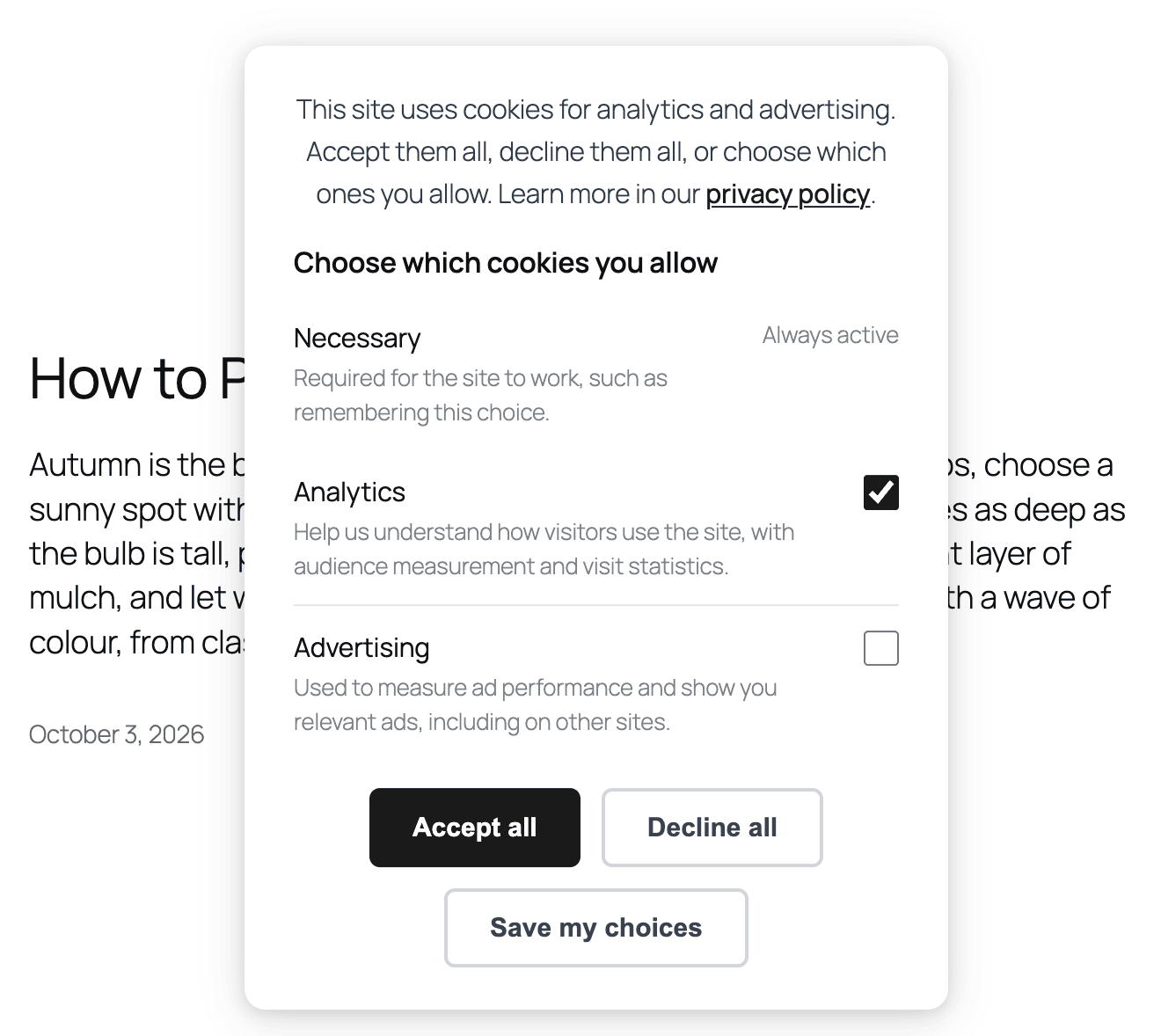
Nothing changes for the visitors who already answered: they are not asked again. The “Cookie preferences” link reopens the panel with their current choices checked. The banner still loads no third-party script, and it still works with page cache plugins, as introduced in 10.3.
The new banner is on by default. To keep the two-button version, go to SEO, Analytics, GDPR / Cookie Bar and turn off Consent per category. You can also rename the Customize button there.
Developers: code that reads the seopress-user-consent-accept cookie directly should switch to window.seopressConsent.has( 'analytics' ) in JavaScript, or seopress_user_consent_has( 'analytics' ) in PHP. A new answer no longer writes the old cookie. The seopress_consent_updated event now also reports partial for a mixed answer, with the list of allowed categories.
🎉 New – Instant Indexing history: was this URL submitted, and when?
Instant Indexing only remembered the last request. Automatic submissions on publish go through the same log, so on an active site the “Latest URLs submitted” box was replaced within minutes. If you wanted to know whether a given page had been sent to Google or Bing, there was no answer.
SEOPress 10.4 records every submission, one line per URL and per search engine:
- the date and time, in your site’s time zone
- the search engine: Google (Indexing API) or IndexNow
- the source: submitted by hand, or automatically on publish
- the HTTP code and the message returned by the search engine, or “Not sent” when the request never left your site (a missing key, for example)
Find it in the new History tab under SEO, Instant Indexing, with a URL search, a Manual / Automatic filter and pagination. Each post also gets an Indexing history tab in the SEO metabox, next to the content analysis, with its last 20 submissions.
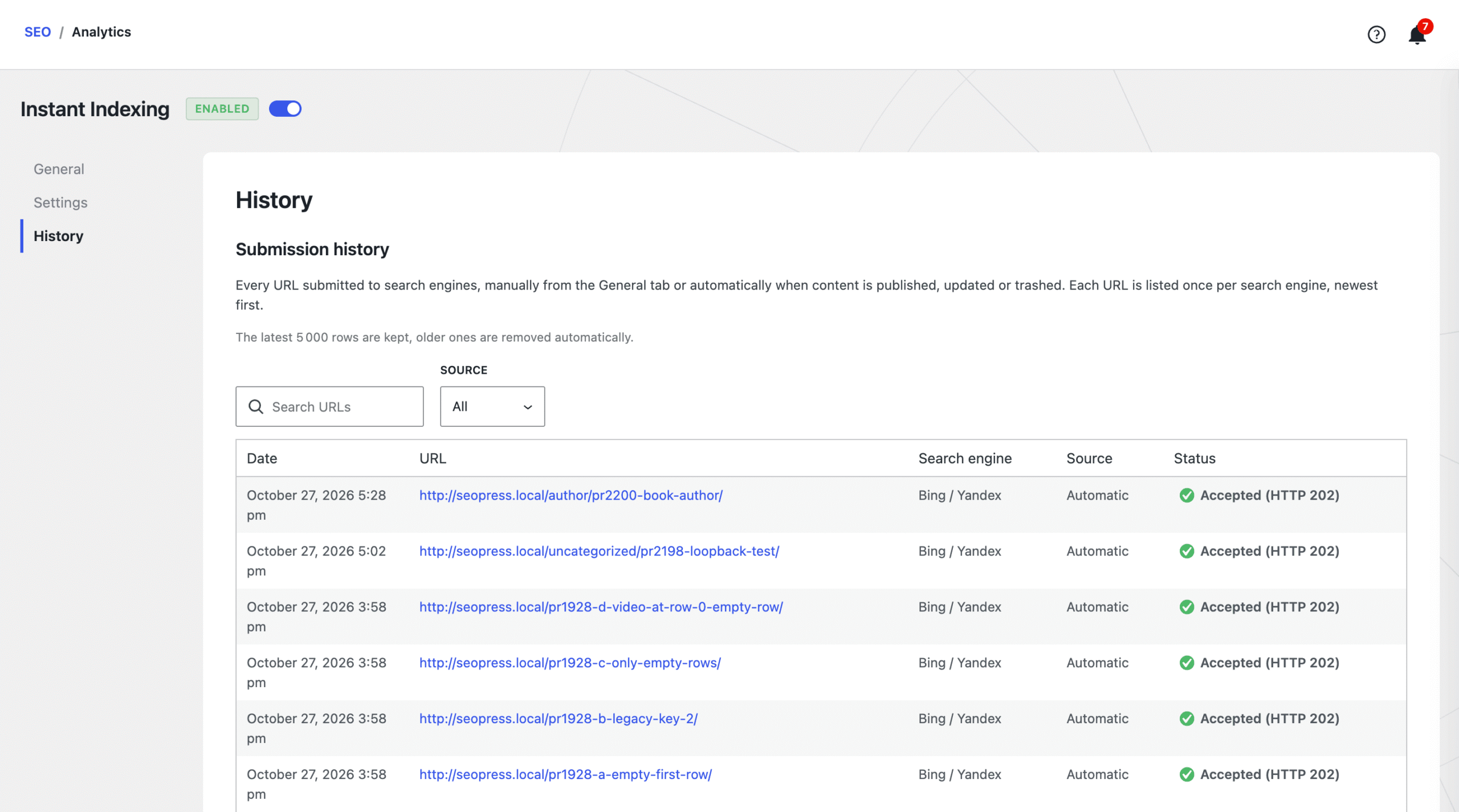
The history keeps the latest 5,000 lines, and you can empty it at any time. Its table is only created on your first submission, so sites that do not use Instant Indexing get nothing new in their database. Read our guide to set up Instant Indexing.
🎉 New – Your AI assistant now works on categories and tags
In 10.3, the SEOPress MCP server only worked on posts, pages and products. Category pages, product categories and tags often rank as well as the products they list, and they had to be done by hand, one term at a time.
SEOPress 10.4 adds 7 tools for taxonomy terms. Your assistant can list the terms with no title or meta description, then read and update their SEO title and meta description, their robots settings and their social settings. For example:
- “List my product categories that have no meta description and write one for each of them.”
- “Check the robots settings of my categories and tell me which ones are set to noindex.”
- “Write the Facebook and X title and description of the Garden tools category.”
- “Suggest an SEO title for each of my product categories.” (PRO)
That brings SEOPress Free to 21 tools. SEOPress PRO adds 15 more, including two new ones that generate an AI title or meta description for a term. They return a suggestion and save nothing: your assistant still needs a write connection to apply it. A role you blocked from the SEO metabox in the security settings can no longer change SEO data over MCP either.
Connecting your AI assistant is also easier. Some of you could not connect it, usually because of your host or a firewall. So:
- If your host blocks the usual sign-in method, the MCP tab notices it and shows you another way to connect
- Each AI assistant now has its own step-by-step instructions, including the Claude desktop app
- A new troubleshooting section helps you when a firewall or a security plugin blocks the connection
- The MCP server now has its own card on the SEO dashboard, so it is easier to find
Read our guide to connect your AI assistant to SEOPress.
🎉 New – Read AI suggestions before they go live (PRO)
Select 50 posts, choose “Generate meta description with AI” in the bulk actions, click Apply: until now, the 50 descriptions were saved straight away, without anyone reading them. Same for the alt texts, captions and descriptions of your images in the Media Library. Google asks site owners to review AI-generated text before publishing it, and titles and meta descriptions are no exception.
SEOPress PRO 10.4 adds a review step. The bulk action now opens a window where the suggestions arrive one by one, each next to the value it would replace. You can edit a suggestion, approve it or discard it. Nothing is approved in advance, and only what you approve is saved. Once you have read the list, an “Approve the remaining” button saves the rest in one click.
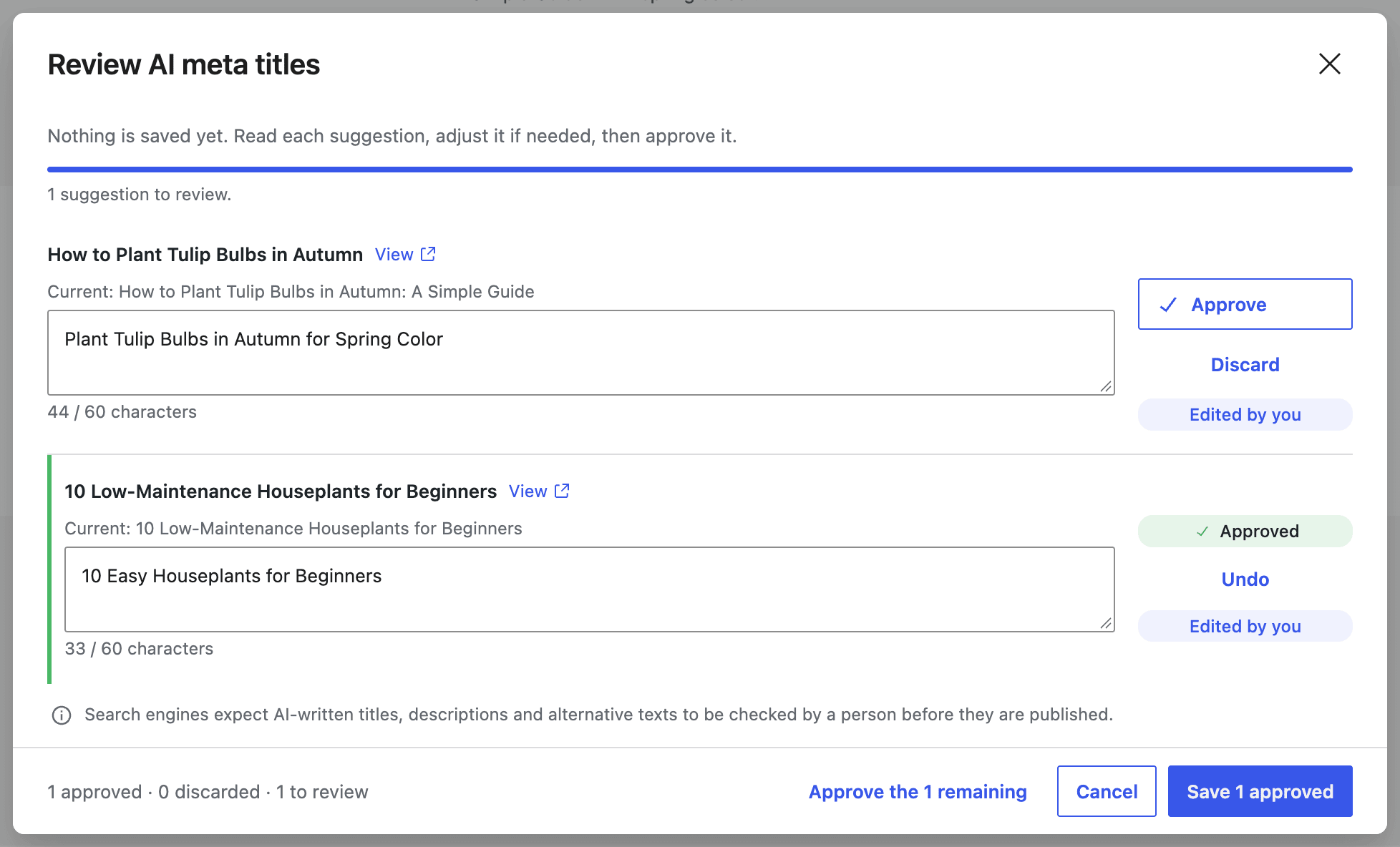
In the editor, the AI assistant’s suggestion cards can also be edited before you apply them. Agencies that prefer the old behavior can bring it back with the seopress_ai_bulk_review filter.
🎉 New – A primary term for every taxonomy
The primary category only existed for Categories and WooCommerce product categories. A recipe site with a “Cuisine” taxonomy, or a documentation with a “Document type” taxonomy, had no way to say which term was the main one.
Every public hierarchical taxonomy now gets its own “Select a primary…” dropdown, in the Classic Editor and in the Block Editor. With SEOPress PRO, your breadcrumbs follow the primary term of the taxonomy you chose for them, whatever it is.
Your permalinks do not change: WordPress only reads the primary category in %category% and in WooCommerce product URLs, as before. If you never use a primary term, you can remove the dropdown from all taxonomies, or just one, with the seopress_primary_term_inline_selector filter.
🎉 Improved – See how many checks each page passes
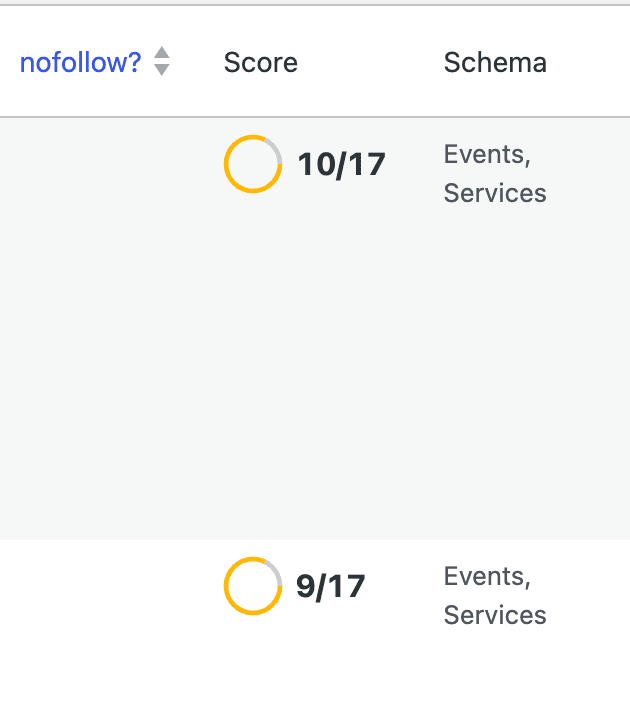
The Score column of your post lists used to say “Good” or “Should be improved”, with nothing in between. A page passing 7 checks out of 17 looked the same as one passing 16. The column now shows the number of checks passed next to the ring, for example 12/17. It only reaches 17/17 when the analysis says “Good”, so the figure never contradicts the details in the editor.
The content analysis itself is more accurate:
- The column, the editor and the MCP tools count exactly the same checks
- Titles and meta descriptions containing variables are measured as they appear in search results, not as raw
%%variables%% - The text a page builder wraps in a shortcode is counted
- Your own images are measured on disk, which makes the analysis faster on image-heavy pages
- The analysis runs as soon as you open the SEO panel, instead of waiting for a click
One more safety net: a single toggle in Titles & Metas can hide a whole post type from search engines, and nothing reminded you of it afterwards. The notification center now warns you when a post type with published content is set to noindex. If it is intended, dismiss the alert.
🎉 Improved – Switching from Yoast SEO
The Yoast SEO importer had three problems with title templates, all fixed in 10.4:
- The home page title is imported. The importer used to replace it with the plain site name.
- Yoast variables are converted. Variables such as
%%name%%,%%pt_plural%%,%%searchphrase%%or%%cf_...%%were printed as plain text in your titles. They are now translated into their SEOPress equivalent, in your templates and in each post and term. - Variables carried over from Yoast display a readable label.
%%title%%or%%sitename%%appeared as raw “title” and “sitename” in the settings, which looked like a broken import.
The Yoast title separator is also imported as a plain character. Read our guide to migrate from Yoast SEO to SEOPress.
🎉 Other enhancements and fixes
New:
- Internal linking suggestions now also read the text of your ACF fields (PRO)
- Your Google Analytics and Matomo charts now show dates along the bottom (PRO)
- When you delete a published post, Bing and the other IndexNow search engines are told right away
Improved:
- Site Audit now tells you which pages it could not check, instead of showing a perfect score by mistake (PRO)
- Matomo now explains why your stats could not be loaded (PRO)
- Security hardening
Fixed:
- The setup wizard could publish your admin email in your site’s structured data. If you have used the wizard, check SEO > Social Networks > Knowledge Graph > Email
- Pages 2, 3 and beyond of a list of posts no longer tell Google they are a copy of page 1
- Classic Editor: your SEO title and meta description could be erased when you updated a post
- Multilingual sites (WPML): your category and tag sitemaps now include every language
- The cookie banner no longer breaks when a plugin optimizes your JavaScript
- Facebook and other social networks now show your site icon when you have not set a default sharing image
- WooCommerce: products on backorder are now shown correctly to Google (PRO)
And many more fixes. Read the full changelog for the complete list.
Don’t forget to subscribe to our newsletter to follow our latest product updates and receive the latest Google News:
You like SEOPress? Please do us a favor: leave a 5-star review on the official WordPress plugins directory to help us. More than 1,200 reviews! Thank you all!
Leave a 5-star review
Changelog
This update contains the following changes (full changelog here):
NEW Cookie banner: visitors can allow analytics and advertising separately, each Google Consent Mode v2 signal following its own category
NEW Instant Indexing: history of every submitted URL (manual and automatic, Google and IndexNow), with a History tab and a per-post view in the metabox
NEW Instant Indexing: IndexNow is notified when a published post is moved to the trash
NEW MCP server: 7 new tools to read and update the SEO title, meta description, robots and social settings of taxonomy terms, plus AI suggestions for terms (PRO)
NEW MCP server: easier connection, with an Application Password fallback when the host blocks OAuth, sign-in steps for each client, a troubleshooting section and a card in the SEO dashboard
NEW AI: review, edit, approve or discard bulk AI suggestions before they are saved, for posts and the Media Library (PRO)
NEW Primary term on every public hierarchical taxonomy, not only categories and product categories, followed by the breadcrumbs (PRO)
NEW Content analysis: the Score column shows the number of checks passed (e.g. 12/17)
NEW Notification center: alert when a post type with published content is set to noindex
NEW Schemas: optional single @graph output for the WebSite and Knowledge Graph schemas
NEW Internal linking suggestions now read the text of ACF and Secure Custom Fields fields (PRO)
NEW Developers: filters for page builders that keep their content outside the post content (seopress_content_analysis_word_count_content, seopress_content_analysis_internal_links_ids), and to hide the primary term dropdown (seopress_primary_term_inline_selector)
INFO Security hardening
INFO Yoast SEO import: the home title template is imported, Yoast variables are converted and get a readable label, and the title separator is kept as a plain character
INFO Content analysis: the column, the editor and the MCP tools count the same checks, titles with variables are measured as rendered, and image checks are faster
INFO Schemas: stable identifiers for Local Business, Service and breadcrumbs, the automatic Article and Video publisher linked to the Knowledge Graph, and a Schema Markup Validator link in the metabox (PRO)
INFO Google Analytics: reports are read through Google's REST API, and seven Google libraries are no longer bundled (PRO)
INFO Site Audit: pages that could not be fetched are reported, and a scan that analyzed no page no longer gets a 100/100 score (PRO)
INFO Dashboard: dates along the axis of the Site overview, Google Analytics and Matomo charts, and Matomo sync errors explained (PRO)
INFO Custom term variables: the value filter is now seopress_get_tag__ct_{slug}_value, the same form as custom fields and user meta. The old seopress_get_tag_ct_{slug}_value still runs, deprecated
INFO WooCommerce: supported versions and HPOS / Cart and Checkout blocks compatibility declared (PRO)
FIX Setup wizard no longer saves the admin email as the Knowledge Graph email published in the Organization schema
FIX Canonical URL of paginated loops on pages and posts, and of ?paged=N URLs with plain permalinks
FIX SEO metabox: the SEO title and meta description could be erased on Update in the Classic Editor when the metabox request failed
FIX SEO metabox: administrators holding a blocked secondary role lost the metabox tabs
FIX XML sitemaps: taxonomy sitemaps are paginated correctly and list the terms of every WPML language
FIX WPML: category rewrite rules are built for every language
FIX Cookie banner no longer broken by JavaScript optimization plugins
FIX Open Graph: no more empty fb:app_id and fb:pages tags, and the site icon is used as og:image when no default image was ever saved
FIX Dynamic variables: %%archive_date%% and %%archive_title%% on archives, several %%_ct_%% in one template, and Bricks content for %%post_excerpt%% and %%post_content%%
FIX Knowledge Graph: Person photo published as image, and X account saved as a full URL read correctly
FIX GTranslate hreflang tags removed on noindex pages
FIX MCP server no longer answers the OAuth discovery requests meant for another plugin's MCP server on the same site
FIX Front-end SEO panel no longer styled by the theme (Enfold and others)
FIX Product schema: BackOrder availability, shipping rates on the shop's tax display, and no empty energy or review blocks (PRO)
FIX Custom schemas accept variables without quotes, and the Book schema date and cover are fixed (PRO)
FIX AI: unsupported image types are refused before sending, a model the account cannot use is replaced, and the AI Assistant no longer renders the page on every editor open (PRO)
FIX White label applied to the PRO admin screens (PRO)