
SEOPress 9.9 is now available. We encourage you to update your site as soon as possible to take advantage of the latest features, improvements, and fixes.
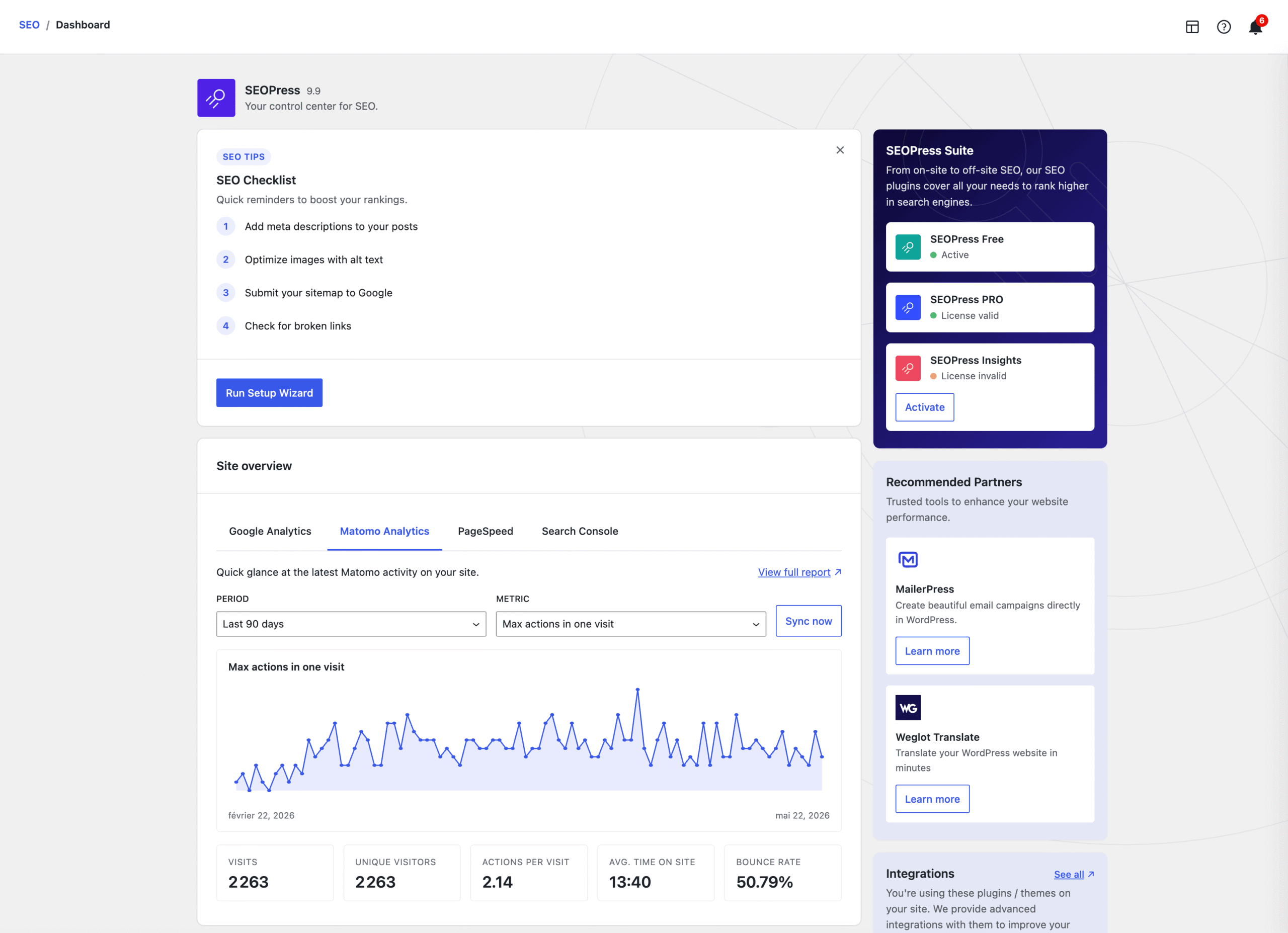
🎉 A brand new SEO dashboard
The first thing you’ll see when you open SEOPress is a completely redesigned dashboard with a modern two-column layout, built in React for faster and easier user experience.
🎉 A new setup wizard
The installation wizard has been fully rebuilt: faster, mobile-friendly, and easier to follow from start to finish.
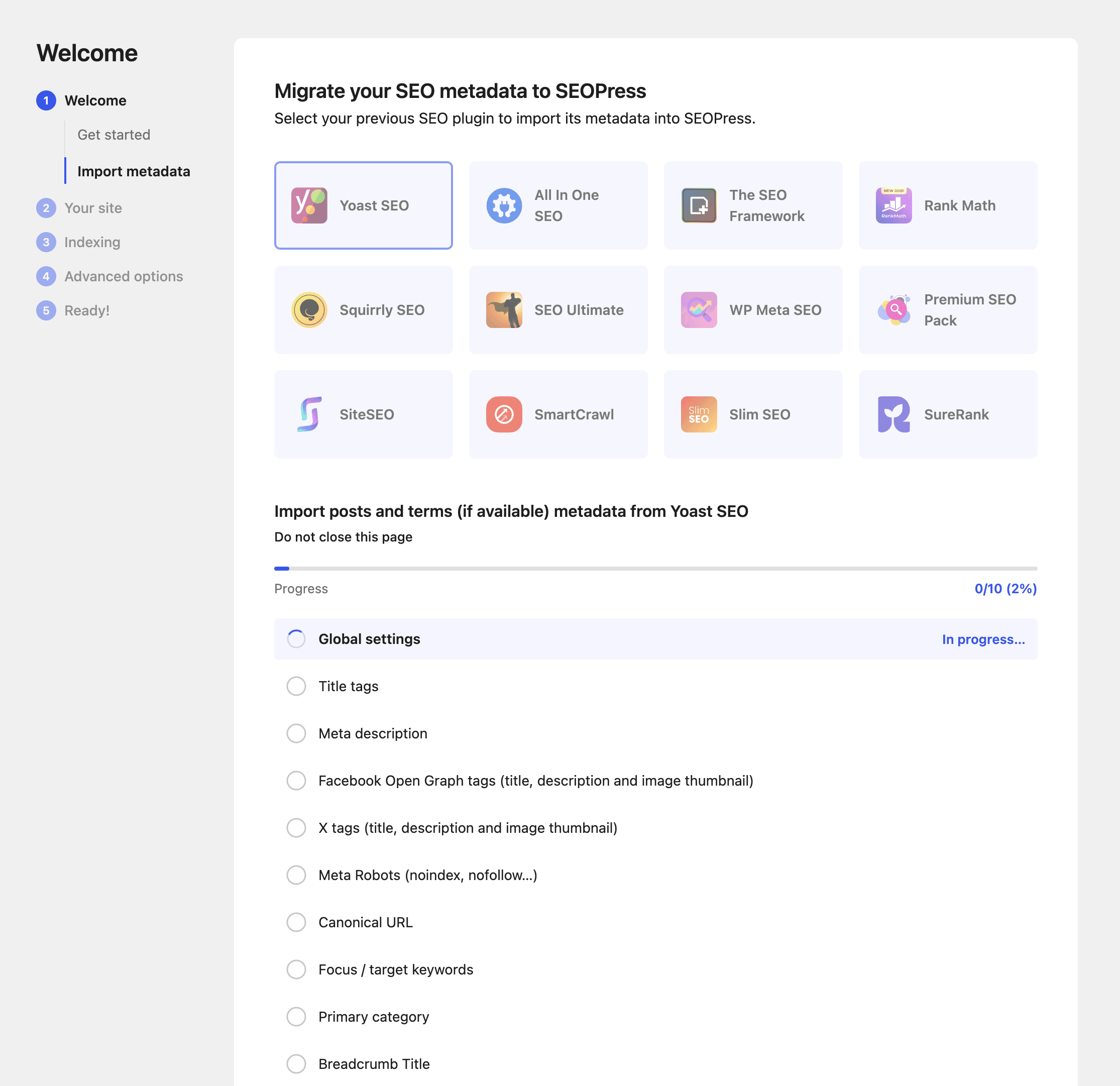
New users get up and running in minutes, no SEO background required.
🎉 A smarter universal SEO metabox when you write
The universal SEO metabox (the one you see when editing a post or page) gets some seriously useful upgrades:
- Edit target keywords in place: Just double-click a keyword to change it. No extra clicks, no separate modal.
- Google keyword suggestions with autocomplete: Start typing in the suggestions field and pick a relevant keyword from the dropdown. Discover what real users search for, right inside your editor.
- One “Update” saves everything: In the Block Editor, clicking the regular Update button now saves every section of the SEO box at once (Title, Description, Advanced, Social, Redirections, Content Analysis). No more tab-by-tab saving.
🎉 Smarter Content Analysis for AI crawlers
We’ve added new content quality and structure checks to help you write articles that both readers and search engines love. Things like:
- Is your content long enough?
- Do you have enough subheadings to make it skimmable?
- Are your sections well-balanced?
And if a particular suggestion doesn’t apply to a given page, you can now hide it for that page only, straight from the editor sidebar. Your checklist stays focused on what actually matters.
🎉 Migrate from SureRank and SmartCrawl
Already using another SEO plugin? Switching to SEOPress just got easier:
- New: one-click migration from SureRank
- Improved: full migration from SmartCrawl, including automatic translation of the variables in your titles and meta descriptions
Your settings, your metadata, your work, all moved across without manual cleanup.
🎉 New – Video schema, auto-filled
Drop a YouTube link in your post? SEOPress automatically populates the Video schema with the title, description, duration and thumbnail. Zero manual copy-paste.
🎉 A huge accessibility upgrade
SEOPress 9.9 ships with a major accessibility pass across the entire admin: keyboard navigation, focus indicators, screen reader support, color contrast. The whole React admin is now WCAG 2.1 AA and RGAA 4.1 compliant.
As a bonus, the SEO admin now automatically matches your WordPress color scheme, pick blue, midnight, sunrise, ectoplasm… SEOPress adapts.
Of course, we can always do better, but this is already a major improvement!
🎉 Other enhancements
We squashed many bugs along the way, including:
- Google snippet preview no longer shows the Elementor template instead of your actual post;
- Internal Linking tab no longer crashes the whole SEO metabox;
- Title templates now preserve spaces around variables on save;
- Custom field variables (
%%_cf_*%%,%%_ct_*%%,%%_ucf_*%%) now work on the home page and blog page; - X (Twitter) handle is automatically cleaned up in social tags;
- OpenAI “Test connection” works again after OpenAI retired the previous endpoint;
- AI metadata uses the correct language per post on WPML / Polylang sites;
- Redirections with accented or non-Latin URLs are now saved correctly;
- Translations load correctly when running WP-CLI commands or cron jobs;
- and so much more!
For developers, three new filters land in this release for fine-grained control on the PRO side:
seopress_search_console_match_url: normalize the URL before Search Console matchingseopress_search_console_match_post_id: override the post ID resolved from a GSC URLseopress_gtag_ec_item_id: customize the product identifier sent to Google Analytics 4 (handy for WooCommerce stores using SKUs or parent product IDs)
Don’t forget to subscribe to our newsletter to follow our latest product updates and receive the latest Google News:
You like SEOPress? Please do us a favor: leave a 5-star review on the official WordPress plugins directory to help us. More than 1,200 reviews! Thank you all!
Leave a 5-star review
Changelog
This update contains the following changes (full changelog here):
* NEW Brand new SEO dashboard and admin header: cleaner two-column layout, one-click module toggles, a guided "Get Started" with numbered steps, and quick access to Help, Display options and notifications (with counter badge) on every SEO page
* NEW Setup wizard fully redesigned: faster, mobile-friendly, and easier to follow from start to finish
* NEW Smarter SEO box: double-click your target keywords to edit them in place, Google keyword suggestions with autocomplete as you type, and clicking "Update" in the Block Editor now saves every section at once (Title, Description, Advanced, Social, Redirections, Content Analysis)
* NEW Content Analysis: new content quality & structure checks to help you write better articles, plus the ability to hide an issue you don't want to fix on a given page
* NEW One-click migration from SureRank, and a full migration from SmartCrawl (variables in your titles & descriptions are automatically translated)
* NEW Tools redesigned: Reset page with confirmation prompts so nothing happens by accident, and Import / Export with a cleaner layout, "export everything" by default, and a Cancel button on CSV exports
* NEW Appearance › Columns: live preview of your post lists with grouped checkboxes — see what you'll get before you save
* NEW Category URL settings now read directly from your WordPress permalink settings (no risk of mismatch)
* NEW Easier-to-remember date variables for schemas (ISO 8601 aliases)
* NEW Big accessibility upgrade across the whole SEO admin (WCAG 2.1 AA / RGAA 4.1 compliant), and the admin now matches your WordPress color scheme automatically
* NEW Cleaner dashboard: removed the Newsroom and SEO Ebooks sections
* NEW [PRO] Site Overview now shows your Google Analytics 4 and Matomo stats directly on the SEO dashboard, with period & metric filters, an interactive chart, and a sync button
* NEW [PRO] Video schema is auto-filled from the first YouTube video found in your post — no manual copy-paste
* NEW [PRO] Redirections: Quick Edit, search results that stay when you go back, search by destination URL, and a dedicated 404 view with a "Delete 404s" shortcut
* NEW [PRO] Friendlier empty states on Schemas and Broken Links screens (clear guidance when there's nothing yet)
* NEW [PRO] Site Audit: detects the new content quality & structure issues
* NEW [PRO] Better Search Console URL matching for multilingual sites (WPML / Polylang),
* NEW Developer filters: `seopress_search_console_match_url`, `seopress_search_console_match_post_id`, and `seopress_gtag_ec_item_id` to customize the product identifier sent to GA4
* INFO Tested up to WordPress 7.0
* FIX Google snippet preview now displays the correct title and description, and no longer shows the Elementor template instead of your actual post
* FIX Internal Linking tab no longer crashes the whole SEO box, and the tag picker no longer scrolls uncontrollably when hovering the last item
* FIX Title / meta description templates: spaces around variables are preserved on save, and custom field variables (%%_cf_*%%, %%_ct_*%%, %%_ucf_*%%) now work on the home page and blog page
* FIX White-label "remove help links" setting is now respected in the new admin header
* FIX SEOPress columns and bulk actions in your post lists are restored after toggling the metabox option (and no error when the bulk actions list is empty)
* FIX Notifications counter and "hide notification" behavior now work as expected
* FIX X (Twitter) handle is now cleaned up automatically in social tags
* FIX [PRO] Custom automatic schemas created in the new editor are now correctly displayed on the front-end, and the Knowledge Graph logo appears in the JSON-LD preview
* FIX [PRO] Redirections: URLs with accented / non-Latin characters are saved correctly, and sorting (hits, type, last hit…) + category counts now match what's shown in the list
* FIX [PRO] OpenAI "Test connection" now works again after OpenAI retired the previous endpoint
* FIX [PRO] AI metadata generation now uses the correct language per post on WPML / Polylang sites
* FIX [PRO] Article schema: X handle and domain are normalized in `sameAs`
* FIX [PRO] Breadcrumbs: display a name fallback when a crumb has no URL
* FIX [PRO] Translations now load correctly when running WP-CLI commands or cron jobs
* FIX [PRO] CSV export: cleaner error messages, no leftover data between exports