

Many SEO guides tell you to write high-quality content without explaining what it means. In practice, high-quality content meets the searcher’s real need, backs its claims with verifiable evidence and is confirmed by how readers respond.
What is high-quality content in SEO?
Google’s guide to creating helpful content comes down to one question: does the page give people what they came for? A well-written page that misses the point of the search fails that test.
To check whether a page passes it, we suggest a framework of three factors:
- Intent: does the page meet the person’s real need?
- Evidence: can readers check what it claims?
- Validation: do readers find what they are looking for?
These factors can be summed up in a formula: Quality = Intent × Evidence × Validation. The multiplication sign matters: if one factor is weak, it pulls down the whole page, however well it is written.
Intent: solving the real problem
A search query is only a few words, but it hides a more specific need. That need is what the page has to answer.
Take the query “free invoicing software for freelancers”. The person searching probably wants a tool that stays free over time and produces invoices that meet their legal obligations.
A list of “free” tools that are only free during a trial matches every word of the query and misses that need. Visitors are likely to go back to the results.
Evidence: backing up what you say
A claim is more convincing when readers can check it. Evidence comes in several forms, starting with the strongest:
- Your own data: results from tests you ran yourself. In a comparison of invoicing tools, for example, say how many invoices you created with each tool and how much it cost you.
- Cited sources: a study, official figures or documentation, with a link to the original.
- Expert input, with the person’s name and what their expertise is based on, such as their job or experience.
Your other articles can also expand on a point. Internal links lead readers to those articles, and the SEOPress PRO content analysis suggests which ones to link to.
Validation: watching how readers respond
Once the page is live, readers show whether it meets their need. If they find what they are looking for, they read the page or go on to other articles on the site. If they go straight back to Google’s results, the page probably did not answer their question.
Analytics tools and Search Console show some of these signals on your own site.
Example: two running shoe guides
Compare two guides to the best running shoes.
- The first helps readers work out their foot type and running style, then recommends suitable models. It meets the intent. It shares the results of its own wear tests, with photos taken by the author: that is its evidence. Readers then go on to other guides on the site, which validates the page.
- The second has 2,000 well-written words taken from manufacturer specs and filled with affiliate links. It relies on no tests and no experience: any other site could publish the same text.
The first is the kind of page Google aims to reward.
How does Google assess content quality?
Google says it uses aggregated and anonymized interaction data to judge whether its results are relevant. It has not confirmed using time on page or scroll depth. These measures remain useful to assess your own pages.
Google also has its results assessed by people, its quality raters. They follow the Search Quality Rater Guidelines published by Google. A central concept in these guidelines is E-E-A-T: Experience, Expertise, Authoritativeness and Trustworthiness.
The raters’ scores help Google check that its systems surface helpful, reliable content. According to Google, these scores are not used directly to rank pages, but the guidelines show what its systems are designed to favor.
Before 2022, these criteria were called E-A-T. Our article on optimizing WordPress sites for E-A-T explains how to apply them.
Other elements count too. The page should offer a good experience, such as fast loading, measured by Core Web Vitals. For some queries, such as news, Google favors recent content.
John Mueller of Google has said that site owners often know better than anyone what quality means for their kind of site. In 2020, he put it this way:
“With regards to quality content, in general this is something where you as the site owner probably know a lot more about what is actually quality content for your specific kind of site.”
That knowledge still has to show on the page.
Who, how and why: Google’s three questions
Google’s helpful content guide suggests asking three questions about each page:
- Who? Readers should know who wrote the page, for example through a byline that leads to a short author bio.
- How? Explain how the content was produced whenever readers might wonder. In a product comparison, say how many products you tested. If you used AI, say at which stage.
- Why? Google describes this as perhaps the most important question. A page should exist first to help its visitors. Content created mainly to attract traffic from Google does not meet that standard.
These questions tie in with the formula: who and how strengthen the evidence, and why relates to intent.
Quality and AI answers
Google’s quality criteria also apply to AI answers. According to Google’s guide to generative AI features, AI Overviews and AI Mode rely on the same core ranking and quality systems as Google Search. The same guide states that the usual SEO best practices remain relevant.
To be shown in these answers, a page must be indexed and allowed to appear in Google with a text excerpt (snippet).
For ChatGPT, Perplexity and other AI assistants, see our guide to generative engine optimization.
What habits help you write high-quality content?
Here are five writing habits that put these criteria into practice.
Make your claims verifiable
This habit strengthens the evidence factor. Give the name of each source and its publication date, and link directly to the original study.
For figures, quote the organization that produced them, such as a national statistics office or an industry body. Avoid citing an article that only repeats them.
Give readers something to do
Information is only useful if readers can act on it. When you explain a process, present it as numbered steps, with examples close to your readers’ situation. Before publishing, check that each section tells readers what they can do.
Write for beginners and experts
Readers arrive with different levels of knowledge. Start with a direct answer, then add the explanation. Keep advanced techniques and special cases for later in the page.
Add a perspective of your own
Repeating what others have published adds little value. Draw on your own experience or share case studies with measured results, such as figures from a client project. What your page adds to the pages already ranking is often called information gain.
Make the page easy to read
Use clear headings and short paragraphs so readers can scan the page. Charts make data easier to grasp. Add a video when it explains something better than text, and give every image descriptive alt text.
How do you check a page with SEOPress?
Prerequisites: SEOPress Free; SEOPress PRO for Google Suggest (step 1) and Search Console data in WordPress (step 4). Level: beginner.
Now check, page by page, that these habits pay off. These five steps work for a blog post as well as a product or category page. Agencies and freelancers can run it on each client site and include the results in their reports.
Step 1: confirm the intent in the search results
Type your main keyword into Google and study the first page. Note which formats rank, such as guides, product pages or comparisons, and which questions they answer.
Use the format searchers expect, then add what these pages leave out: an example, a figure, or an answer to a question they skip.
With SEOPress PRO, Google Suggest shows the top 10 suggestions for a keyword directly in the content analysis. These are the suggestions that appear as you type a query in Google. It is a quick way to spot related questions to cover.
Step 2: run the content analysis before publishing
Enter your target keywords in the SEO metabox of your post, the SEOPress panel below the editor. SEOPress Content Analysis then scans the full source code, the way a search engine crawler would, and runs 17 SEO checks.
Suggestions are sorted by priority, and you can hide those that do not apply to a given page. The analysis is included in the free version of SEOPress.
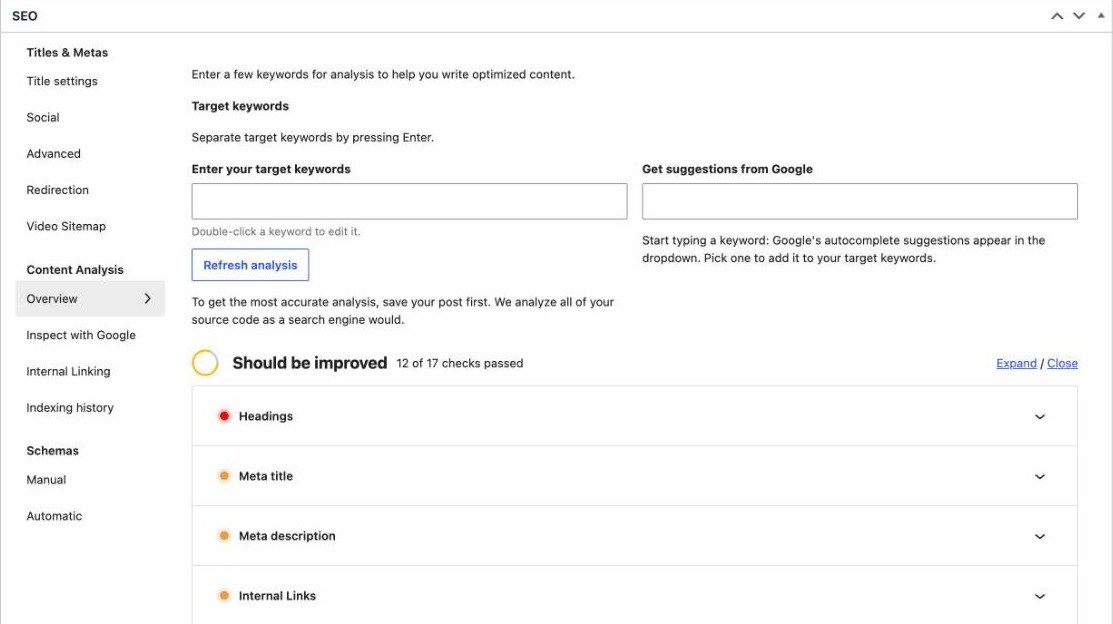
These checks cover:
- Keyword placement in the main elements of the page.
- Meta tags, canonical URL (the version of the page Google should index) and robots directives (instructions that allow or block indexing).
- Images and their alternative text.
- Internal links, outbound links and structured data.
- The length of your text, the number of subheadings and the balance between sections.
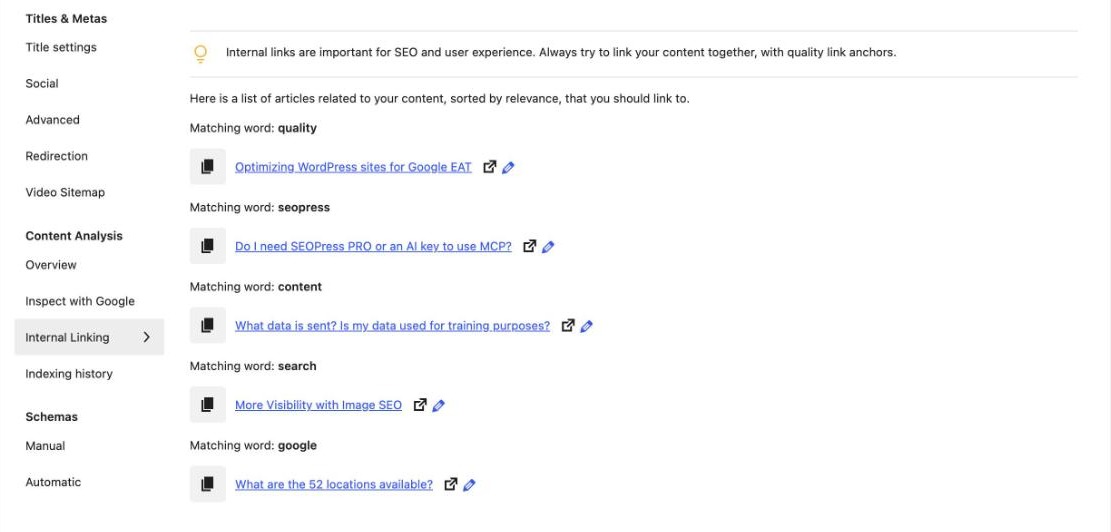
In the PRO version, the analysis also suggests up to 5 existing posts to link to, chosen from the terms your posts have in common.
Step 3: reread the page with Google’s three questions
Before you click Publish, ask Google’s three questions: who wrote the page, how it was made and why it exists. Check that the author is visible and that your process is explained where readers expect it. Then ask yourself whether you would publish the page even without search traffic.
Step 4: read the results after a few weeks
Your analytics tool, such as Google Analytics or Matomo, shows how long visitors stay and how many leave without interacting.
Google Analytics 4 records by default when visitors reach 90% of a page. For finer scroll depth, you need a custom event or a heatmap tool, such as the paid Heatmap & Session Recording plugin for Matomo. This plugin also shows where visitors click.
Search Console reports the clicks and impressions each page gets in Google Search. Shares and mentions are another useful clue.
A page that answers a quick question can satisfy readers who leave right away, so interpret these metrics in light of the page’s purpose.
These figures vary widely by industry and page type, so compare each page with similar pages on your own site.
SEOPress PRO brings some of this data into WordPress. The SEOPress dashboard displays your main Google Analytics or Matomo metrics. The SEO metabox shows the clicks, impressions, click-through rate (CTR) and average position of each post, taken from Search Console.
Once the post has had time to appear in search results, open it in the editor and check this data. Many impressions with few clicks often point to a title or meta description to rework. A position that slips over time may call for a content update.
Step 5: schedule regular reviews
A simple rhythm keeps your content up to date:
- Monthly: check time on page and the share of visitors who leave without interacting, and compare them with your own averages.
- Quarterly: update statistics and add new information.
- Once a year: check that each page still matches what searchers want, and reorganize it if needed.
When traffic to a page drops, look for the cause. Search intent may have shifted, or competing pages may now answer the query better.
Which mistakes hold content back?
Even with these habits in place, a few mistakes can undo part of the work. Here are the most common ones.
Errors that are easy to miss
Keyword stuffing rarely looks like the blocks of identical terms seen years ago. Today, it shows up as the exact keyword forced into every heading. It also appears as a phrase repeated far more often than natural writing would allow.
Another frequent issue is a long introduction. When the answer comes late, readers may leave. Put the key information near the top, then add the context.
Outdated pages lose ground too. Old statistics and broken links tell readers that a page is no longer maintained. Even content that does not date quickly needs a yearly check.
Focusing on technical SEO at the expense of the text is another common mistake. Structured data (schema markup) and clean meta tags help search engines understand and display your content, but the text is what answers the reader.
The quantity trap
Careful work takes time. When a publishing schedule leaves no room for research or review, quality suffers.
Taken to the extreme, the race for volume becomes a spam issue. Google’s policies target scaled content abuse, which means generating many pages mainly to manipulate rankings, however they are produced.
Set a pace you can sustain while giving every piece the same care. A few useful articles are worth more than many pages with little substance.
AI content without review
AI tools can speed up research and drafting. Published without review, the text they produce often lacks first-hand experience and reliable fact-checking.
Google’s guidance on generative AI content asks that such content meet the same standards as the rest of your pages. It also recommends reviewing everything an AI tool produces, including titles, meta descriptions and alt text.
SEOPress PRO applies the same principle. Since version 10.4, metadata generated in bulk with AI goes through a review step, and only what you approve is saved.
What should you do next?
- Pick one important page and write down, in one sentence, the need behind its main query.
- Install SEOPress Free and run the content analysis on that page: its 17 checks are included in the free version.
- Add evidence where a claim has no source, and show who wrote the page.
- After a few weeks, check the page’s clicks and impressions in Search Console. SEOPress PRO shows them in WordPress, along with Google Suggest and internal linking suggestions.
- For a wider view of page optimization, read our guide to WordPress on-page SEO.
FAQ about high-quality content
Does Google penalize AI-generated content?
Not because AI helped write it. Google judges content on its quality, whatever tool was used. Its spam policies target scaled content abuse: producing many pages mainly to manipulate rankings.
Is there an ideal length for high-quality content?
No. Google’s helpful content guide states that Google has no preferred word count. A page should be as long as the answer requires, and no longer.
Is E-E-A-T a ranking factor?
Not directly. According to Google, E-E-A-T is not a specific ranking factor. Its systems use a mix of signals to identify content that shows experience, expertise, authoritativeness and trustworthiness.
How can I check whether my content meets Google’s expectations?
Follow these five steps:
- confirm the intent in the search results;
- run the SEOPress content analysis;
- reread the page with Google’s three questions;
- read the results after a few weeks;
- schedule regular reviews.


