

Worried about your backlinks? Afraid that a sudden wave of unfamiliar URLs could hurt your rankings? You’re far from alone. Many site owners fear that a single mistake will cost them their positions.
What most SEO guides don’t tell you is that these fears are rarely justified. Google can identify and ignore the majority of spam links on its own. Links from scraper sites or automated directories, for example, are common and usually have no effect on your rankings.
For a WordPress site, the key is to act on what you control: the quality of your content and the protection of the links you earn. This guide shows you how to build authority step by step, with safe methods and the help of SEOPress.
Backlink fundamentals: what matters for WordPress SEO
A backlink is a link from another website to yours. It plays two roles: it acts as a recommendation to search engines, which can improve your rankings, and it brings you visitors who are curious to discover your site.
Being cited on reputable sites can also help ChatGPT, Perplexity, Gemini or Google’s AI Mode find your content and use it in their answers. The same precautions apply: Google’s spam policies cover attempts to manipulate generative AI responses in Search.
Good or bad backlink: how to tell the difference
A good backlink comes from a site close to your topic and recognized in its field. It fits logically into the text. A bad backlink sits on an unrelated site, a spam directory or a paid link scheme. One link from a respected blog in your industry carries more weight than dozens of poor-quality links.
A content-first strategy for earning valuable links
The most sustainable approach is to publish content so useful that other sites want to reference it. Solve real problems and bring a fresh perspective: links will follow.
Content that attracts links
- In-depth guides that become a reference on a complex topic.
- Original research and data that journalists and bloggers need to support their articles.
- Guest posts on recognized sites in your field, as long as they bring real value and avoid keyword-rich anchors, which Google treats as link spam.
- Visual content, such as infographics, shared elsewhere with an attribution link.
- Free tools, such as calculators or templates, that stay useful over time.
Safe outreach built on relationships
To earn links, build real connections with people and avoid mass email campaigns. Personalize every message: mention a specific article by the person you contact and show what your content brings to their readers. One effective method is broken link building: find dead links on sites in your niche and suggest your content as a replacement.
Link sources close to your business
The best links frequently come from people who already know you. The following opportunities exist in almost every trade:
- Suppliers, manufacturers and distributors. Many list their resellers, installers or certified partners on a dedicated page. Ask to be added.
- Customers and business partners. A testimonial or a case study on their website usually includes a link to yours.
- Professional associations and labels. Industry federations, chambers of commerce and certification bodies often publish a directory of their members.
- Local press and sponsorship. Supporting an event, club or charity in your area sometimes earns you a mention online. Regional media also like to feature nearby businesses. To strengthen these local signals, see our WordPress local SEO guide.
- Serious industry directories. A few recognized ones in your sector are worth joining. Stay away from generic directories that accept any site: they add no value and look like spam.
- Unlinked mentions. Search for your brand or product name. When a site talks about you without linking to yours, a short, polite message usually gets a link added.
The role of WordPress plugins in your backlink strategy
First, let’s set aside a persistent myth: no plugin can create backlinks to your site. These links live on other websites, out of reach of your WordPress installation. Be wary of tools that promise to “automatically build high-quality backlinks”: they are misleading you, or relying on risky practices.
Here is what remains possible:
- Manage internal links between your pages.
- Detect 404 errors that waste the value of your links.
- Create redirects to keep the value of links pointing to a deleted or moved page.
- Monitor your backlink profile.
Found harmful links? There is no way to block them from WordPress. You can, however, use Google’s disavow tool to ask Google to disregard these links. It should be used with caution, and only when necessary. Disavowing useful links by mistake can lower your rankings.
How SEOPress supports your backlink strategy
Earning links is one thing; keeping them is another. Every redesign or URL change can create 404 errors, and the backlinks pointing to those pages lose their value. SEOPress PRO limits this risk with two features:
- 404 Monitoring records every URL on your site that returns a 404 error and can email you a weekly report. You can then see which missing pages still get visits. When you change a slug or delete a post, a notice lets you create the redirect in two clicks.
- Redirection Manager makes fixing broken links simple: redirect a broken URL to a relevant, live page, right from WordPress. The link keeps most of its value, without editing the .htaccess file.
Monitoring your backlink profile with SEOPress Insights
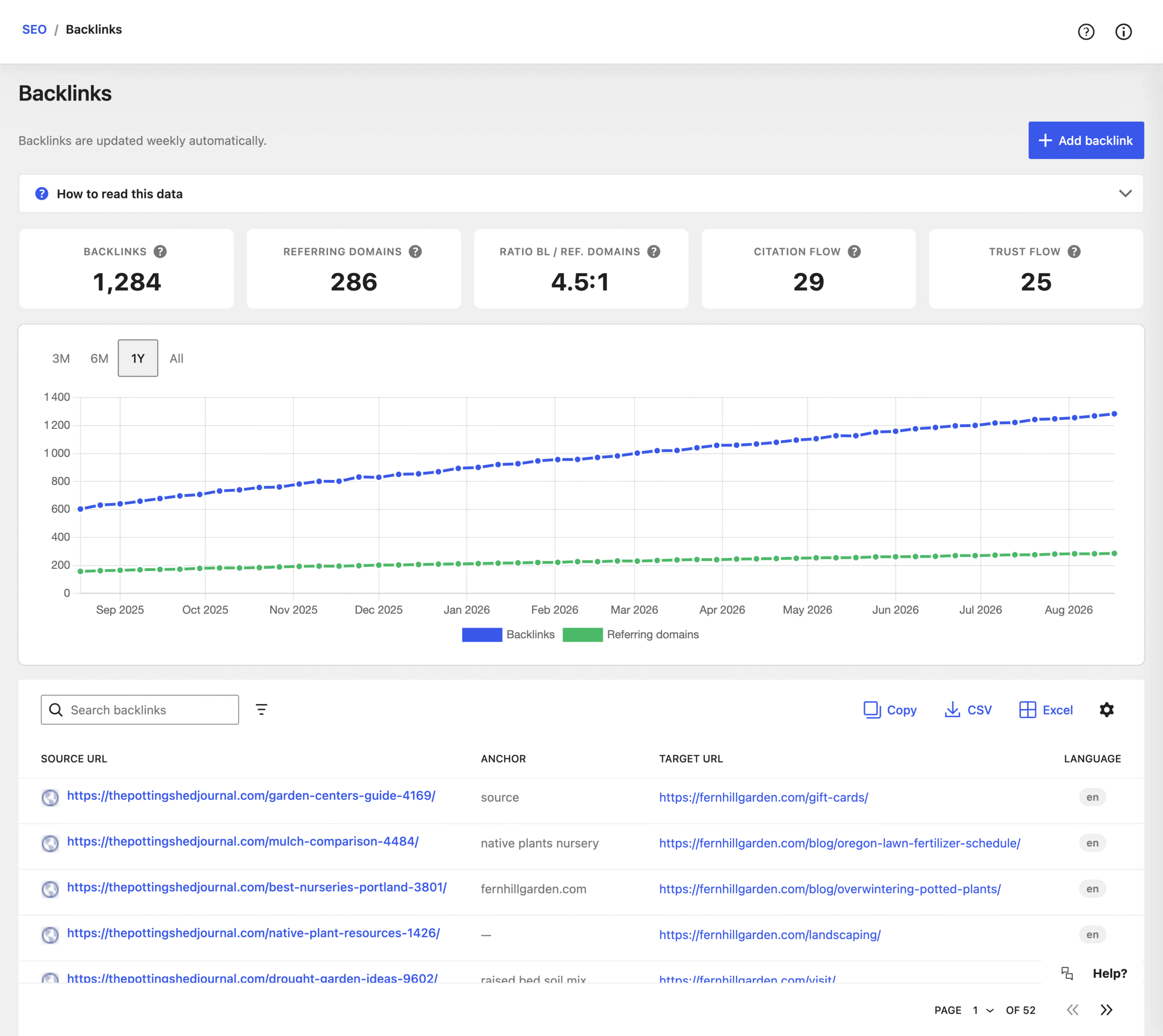
Google Search Console provides basic data (Search Console > Links > External links > Top linking sites). SEOPress Insights goes further and displays your backlinks right in your WordPress dashboard.
Insights collects your new backlinks automatically every week, using Majestic as its source. Here is a simple routine to make the most of this information:
- Check the trend. The Backlinks screen shows your total links, your referring domains and your Citation Flow and Trust Flow scores. The trend chart matters more than today’s figures: a steady rise in referring domains is a better sign than a sudden jump in links.
- Sort by quality. Order the table by Trust Flow to see your best links. Also check the anchor, language and nofollow columns. A wave of links from unrelated sites with low Trust Flow can point to a negative SEO attack. Monitor this kind of activity. Only consider the disavow tool if these links have caused a manual action, or are likely to.
- Protect the pages that earn links. Check the target URLs of your best backlinks. Does one of them return a 404? Redirect it to the closest live page with SEOPress PRO. You can also export the list to CSV or Excel to share it or plan your outreach.
Common backlink mistakes and myths
Some practices do more harm than good, starting with paid links. Buying links that pass authority violates Google’s anti-spam rules. The possible penalty: a manual action and a sharp drop in rankings. This shortcut still tempts site owners in a hurry. And Google keeps improving its detection: in 2026 alone, it rolled out at least three spam updates (March, June and August).
Other common mistakes:
- Chasing quantity: an offer such as “100 backlinks in 30 days” should make you cautious. A fast, artificial rise in links is exactly what SpamBrain, Google’s spam detection system, is designed to catch.
- Trusting “partner network” plugins: their automatic link exchanges can lead to a manual action.
- Neglecting internal linking: while looking for external links, it’s easy to forget that links between your own pages spread authority across your whole site. Each link you earn then benefits more pages.
Common myths
- “Social media shares create backlinks”: your posts on Facebook or X bring traffic and visibility. However, they don’t pass SEO authority. Social signals help people discover you, without replacing genuine editorial links.
- “I need expensive tools to start”: Google Search Console is enough to get started, and it’s free. It shows who cites you, which pages they target and which anchors they use. To go further, SEOPress Insights offers affordable monitoring built into WordPress.
From zero to authority: your first 90 days
Now it’s time to put all this into practice. Authority doesn’t come from a single campaign. A clear order still helps you avoid spreading your efforts too thin. Here is a realistic plan for a site starting with few or no backlinks.
Days 1 to 30: get the basics right
- Open the Links report in Google Search Console: which sites already cite you, and which pages do they target?
- Enable 404 monitoring in SEOPress PRO and redirect broken URLs that still get visits.
- Choose two or three pages to strengthen, such as a key service page or your best guide. Add internal links to them from related content.
Days 31 to 60: create content worth citing
- Publish a reference piece: an in-depth guide, original data, a checklist or a free template.
- List 15 to 20 sites in your niche: blogs, suppliers, partners, local media. Contact them one by one, with a personalized message.
- During this outreach, also look for broken links and unlinked brand mentions: they are often the easiest to turn into links.
Days 61 to 90: measure and adjust
- Compare your referring domains with your starting point, in Search Console or SEOPress Insights.
- Identify the content and approaches that brought links. Repeat what worked.
Keep realistic expectations: a few quality new domains in three months is real progress, and far safer than hundreds of artificial links.
Backlinks: a long-term effort
Solid authority builds up over several months, with every piece of content you publish and every relationship you develop. SEOPress PRO and SEOPress Insights handle the technical side: protecting your links and tracking their progress.
“I’ve used WP SEOPress for many years, and this plugin is hands down the best for SEO optimization. The few times I’ve needed support, it’s been lightning fast and excellent.” – Tomas Risberg, September 2026
Discover SEOPress PRO to protect your links and SEOPress Insights to track your backlinks.


