

SEOPress 10.0 is now available. We encourage you to update your site as soon as possible to take advantage of the latest features, improvements, and fixes.
🎉 New – Connect SEOPress to AI agents with the new Abilities API & MCP support
SEOPress 10 adds support for the new WordPress Abilities API, the standard that lets AI assistants and automation tools work with your site safely.
In plain terms, you can now connect an AI agent (like Claude or any MCP-compatible tool) straight to SEOPress and let it take care of SEO tasks for you.
Out of the box, the free version lets an agent read and update the essentials of any page: the SEO title and meta description, the indexing rules (noindex, nofollow, canonical), the social media previews for Facebook and X, and it can even run a content analysis to point out what to improve.
With SEOPress PRO, agents can go much further: create and manage redirects, edit structured data (schema), set target keywords, and even generate AI-optimized titles, meta descriptions, and image alt text for you.
PRO also makes your whole site “agent ready” by exposing discovery signals (an MCP server card, an llms.txt file, and other /.well-known/ endpoints) so AI tools can find and understand your content on their own. The benefit is simple: far less manual, repetitive SEO work, and more time for what actually matters.
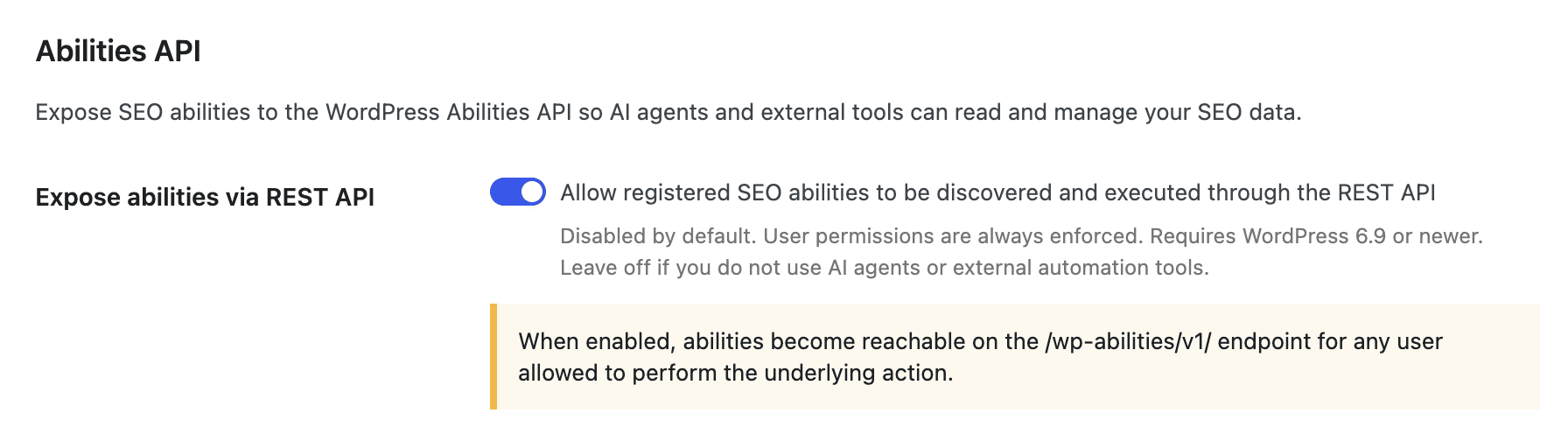
And you stay fully in control. The feature is off by default, you turn it on with a single toggle from SEO, Advanced settings page, Advanced tab, Expose abilities via REST API option, and your existing WordPress permissions are always respected, so an agent can only ever do what the connected user is already allowed to do.
🎉 New – Get an SEO expert by your side, with the new AI Assistant
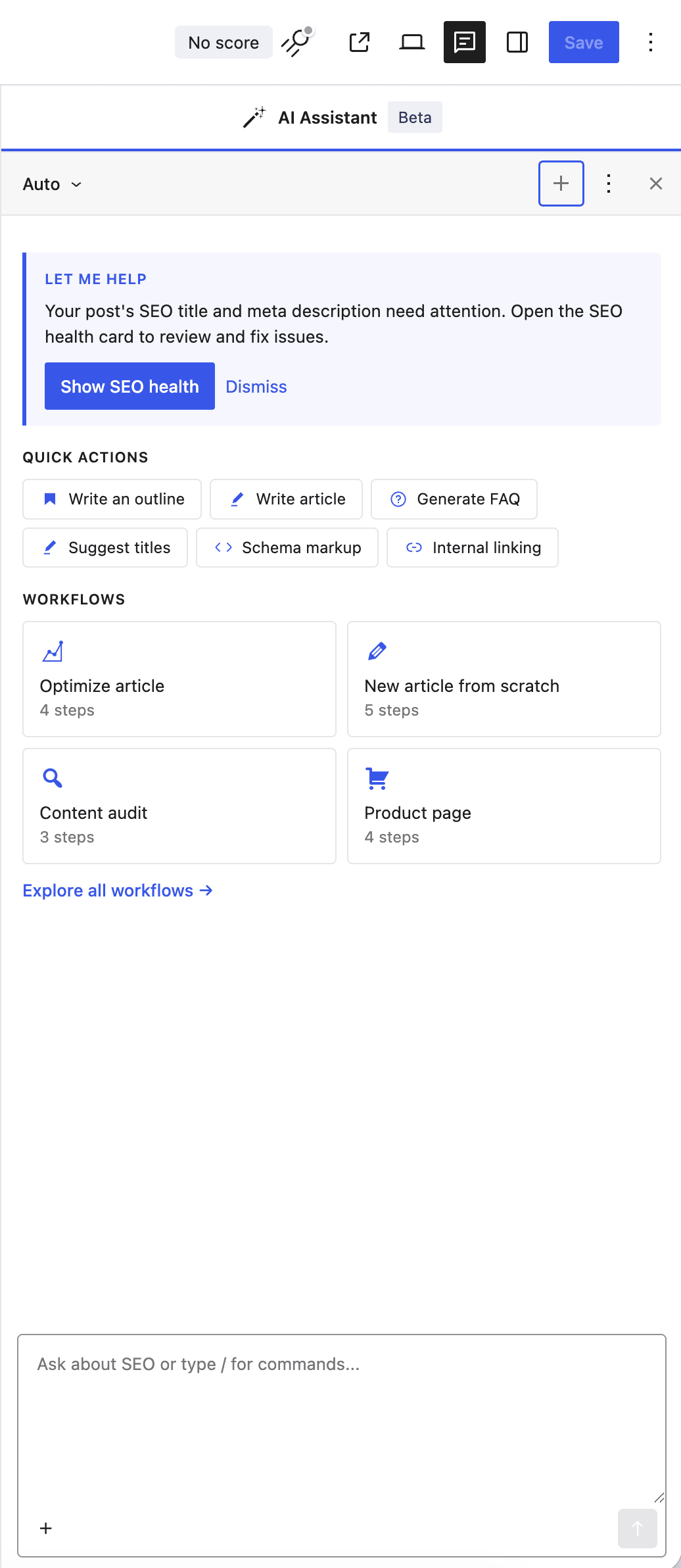
Writing good SEO takes time, and knowing exactly what to fix is not always obvious. SEOPress 10 introduces the AI Assistant, a chat panel that works alongside you in the WordPress block editor.
You just ask in plain language, like talking to a colleague: “Suggest 5 titles for this article”, “Write an outline about…”, “Fix my SEO issues”, or “Translate my meta description into Spanish”. Because the assistant reads your current post (its content, keywords, and SEO settings), the answers are tailored to what you are actually working on, not generic advice.
It can help you with things like:
- Generating SEO titles, meta descriptions, and social media tags
- Writing full articles, outlines, FAQs, and product descriptions
- Improving existing content: proofreading, changing the tone, summarizing, translating
- Taking action for you: creating redirects, adding structured data, generating image alt text, and more
And you always stay in charge: when the assistant suggests content, the changes are proposed for your review before anything is applied, so you can accept, tweak, or discard them.
The AI Assistant is a SEOPress PRO feature, and it runs on your own AI provider. It works with OpenAI, Claude, Google Gemini, Mistral, and DeepSeek, or with SEOPress credits if you prefer a ready-to-go option. Add your API key once, and your assistant is ready to help.
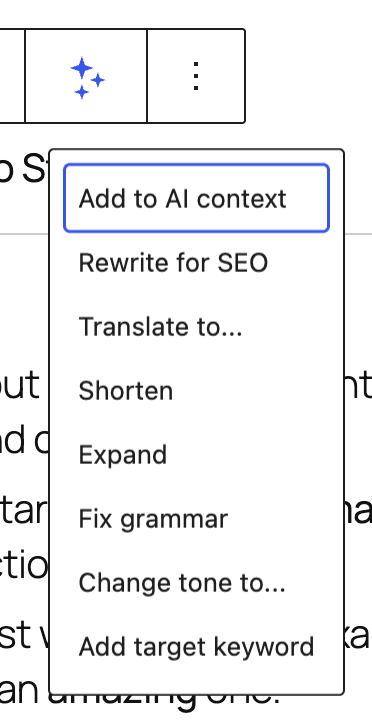
BONUS: perform quick actions right into the block editor. Select a block, click on the AI icon to run quick actions:
🎉 New – The easiest way to use AI in SEOPress, with SEOPress AI Credits
SEOPress works with all the major AI providers (OpenAI, Claude, Gemini, Mistral, DeepSeek), but setting one up means creating an account, generating an API key, adding a payment method, and tracking your usage on yet another platform. That is a lot of steps before you can even write your first title.
SEOPress AI Credits removes all of that. It is a ready-to-go option built right into SEOPress: no separate account, no third-party API keys to manage, no third-party billing.
Here is how simple it is:
- Subscribe to SEOPress AI Credits on seopress.org
- Copy the license key from your confirmation email
- Paste it into your AI settings and save
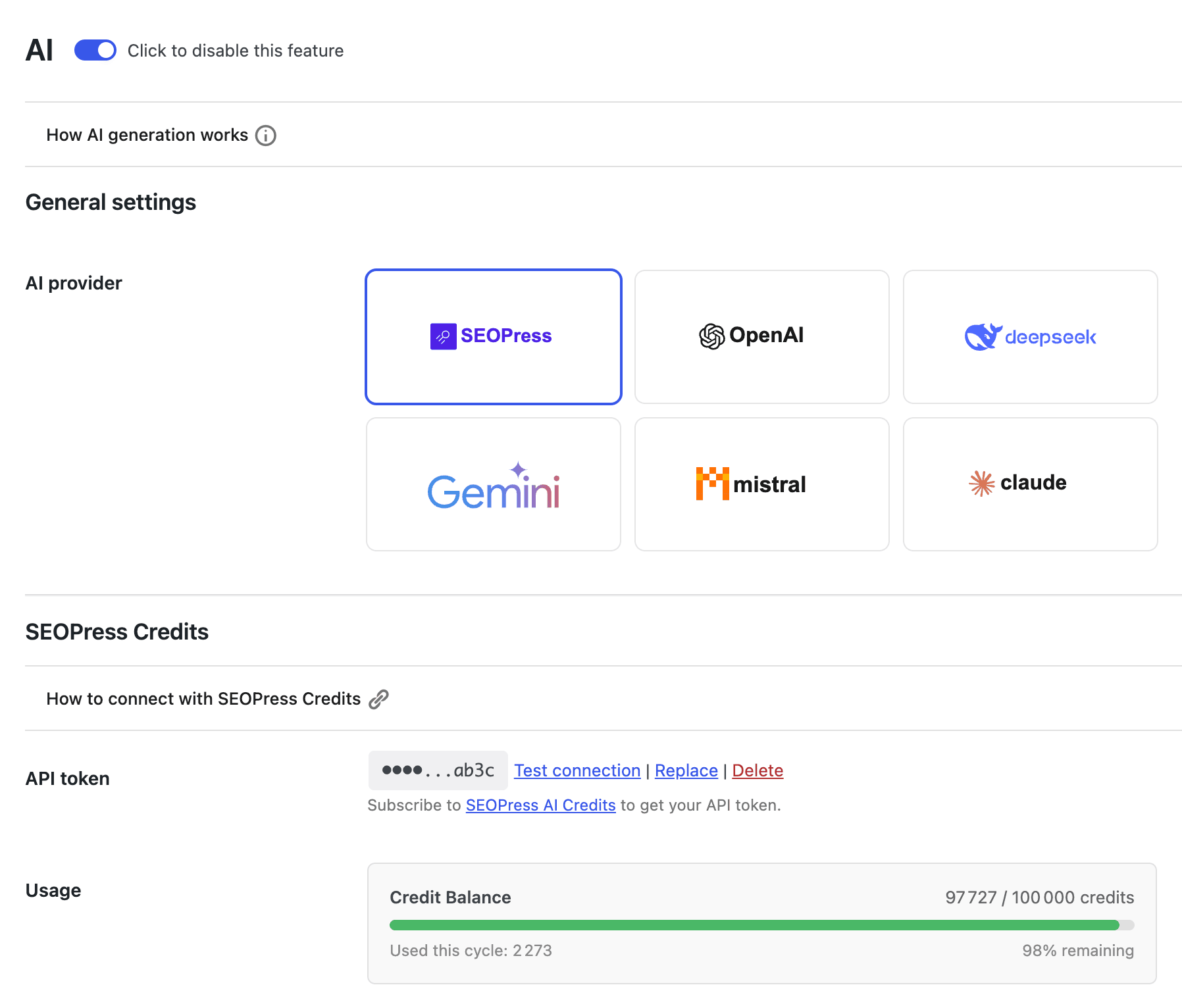
That is it. Your credits instantly power every AI feature in SEOPress: generating SEO titles, meta descriptions, social tags (Open Graph and X), and image alt text, in bulk or one at a time, plus the AI Assistant chat.
You always know where you stand, too. Your settings show a clear credit balance, how much you have used this cycle, and a color-coded bar that warns you before you run low. And because the best AI model is selected for you behind the scenes, you never have to wonder which one to pick.
SEOPress AI Credits is a SEOPress PRO feature. And if you would rather use your own provider and API key, you still can. The choice is yours.
🎉 New – Make sure search engines can actually read your sitemap, with the new XML Sitemap health check
Your XML sitemap is the map search engines use to find every page on your site. So when something breaks, your content can quietly stop being indexed.
The tricky part is that sitemap problems are easy to miss: a caching plugin serving the wrong file, a 404 error, a stray blank line that corrupts the XML, or a robots.txt rule that blocks access.
SEOPress 10 introduces a free Sitemap health check that catches these issues for you in one click. Open your sitemap settings, press “Test my sitemap”, and SEOPress runs a full diagnostic, then tells you in plain language whether your sitemap is healthy or what needs attention.
It checks that your sitemap is:
- Reachable (no 404 or server error)
- Served as real XML, not HTML
- Valid and well formed
- Referenced in your robots.txt
- Not disturbed by a caching plugin or a second SEO plugin running at the same time
Every result comes with a clear pass, warning, or error label and a simple explanation, and common problems like a 404 can be solved with a single fix button.
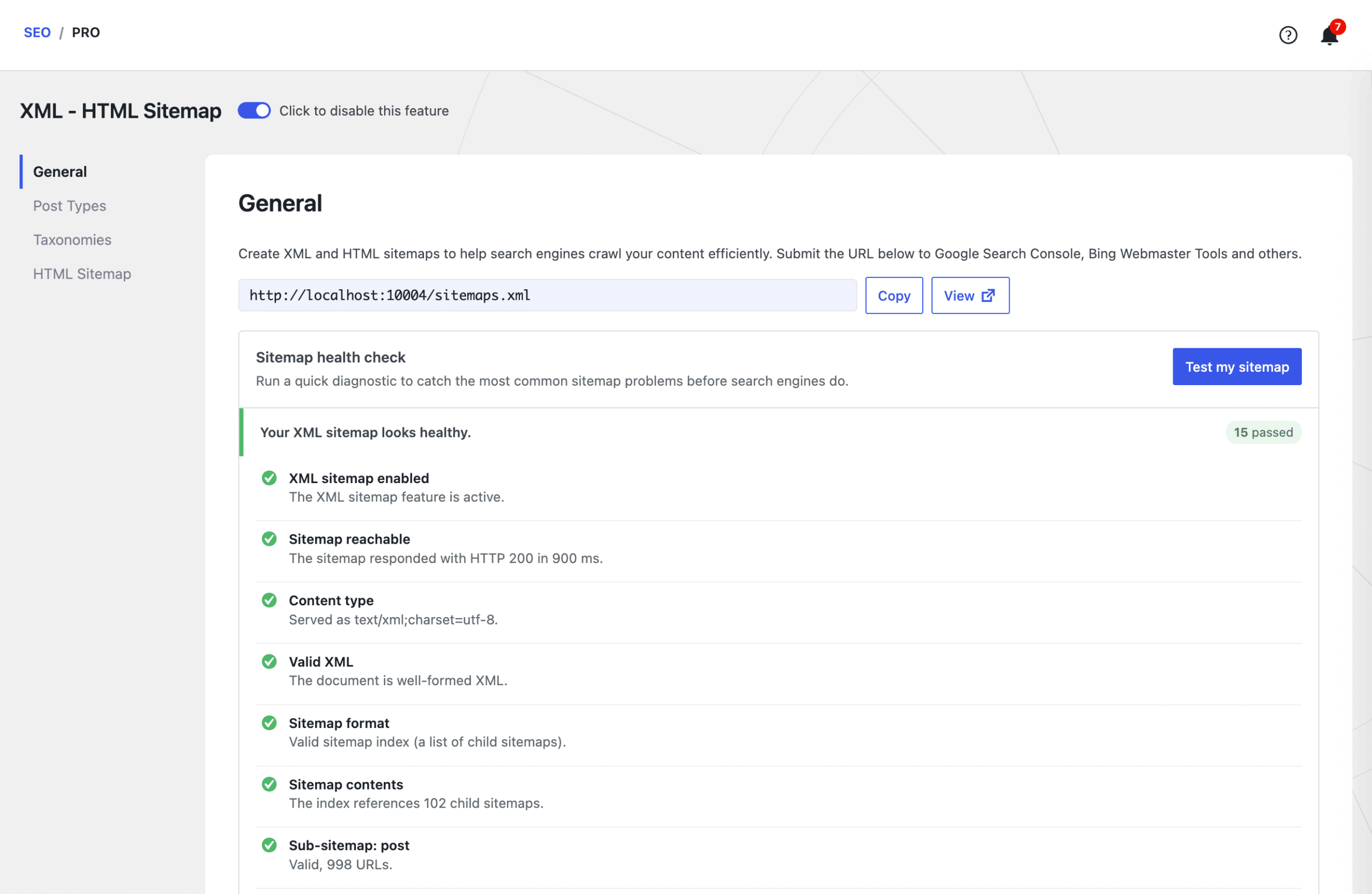
No technical knowledge required: you get the confidence that search engines can read your sitemap, before they ever hit a problem.
And SEOPress PRO takes it further by running this check automatically twice a day and alerting you by email or Slack the moment an error shows up, so a broken sitemap never goes unnoticed.
🎉 New – Choose exactly which image metadata AI fills in, automatically
Good image SEO is more than just an alt text. Search engines and accessibility tools also read the caption and description of your media. But filling those in by hand, for every image you upload, is tedious, so they usually stay empty.
SEOPress PRO can already generate image metadata with AI the moment you upload an image. SEOPress 10 makes it smarter with per-field toggles: you decide exactly which fields get written for you.
Turn on only what you need:
- Alt text: the description used for SEO and accessibility
- Caption: the short text shown under the image
- Description: the longer text stored with the media
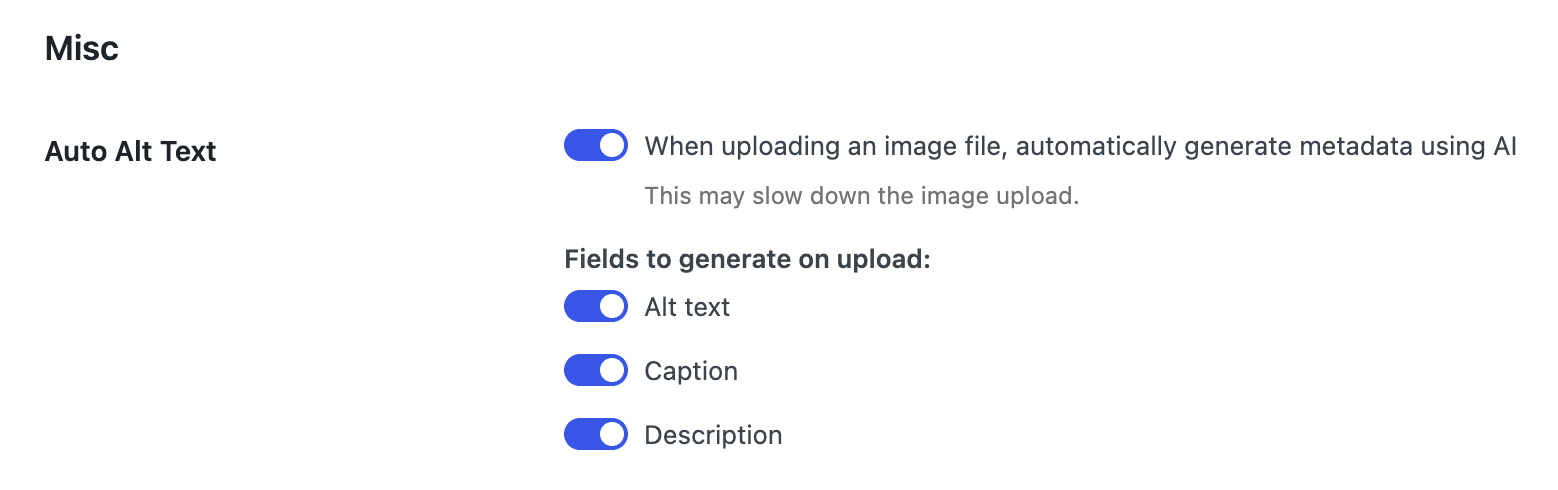
For example, you can let AI write the alt text on every upload while leaving captions and descriptions untouched, or generate all three at once. It only fills in empty fields, so your existing work is never overwritten.
Prefer to handle some images yourself? You still get bulk actions in the media library to generate any combination of these fields, for all your images or only the ones that are missing them.
This runs on your configured AI provider or on SEOPress AI Credits, and it is a SEOPress PRO feature.
🎉 New – Turn readers into loyal followers, with the new Google Preferred Sources button
Google now lets people choose their “Preferred Sources”: the sites they want to see more often in the Top Stories section of Google Search. The catch is that readers have to know they can do it, and that they can do it for your site.
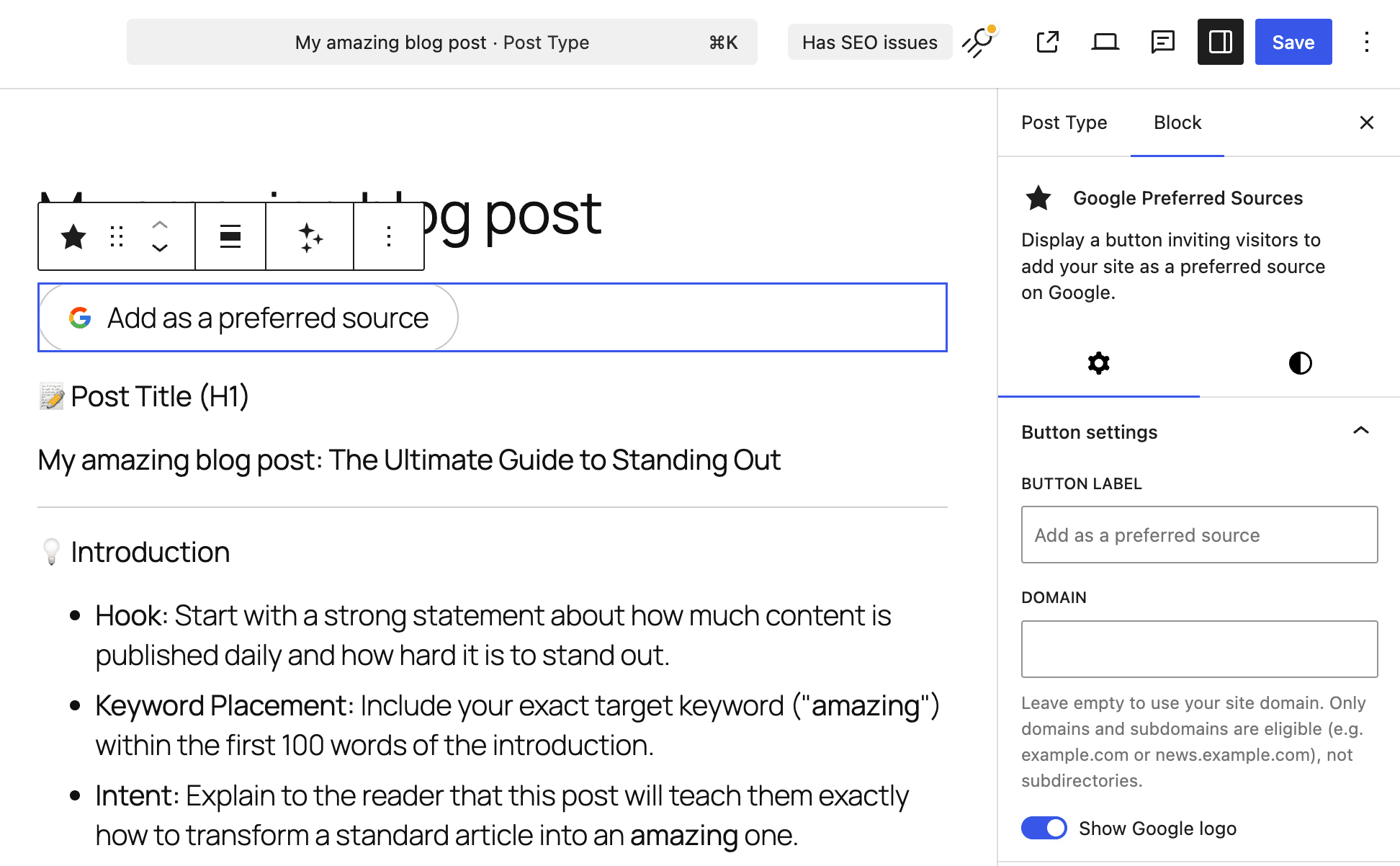
SEOPress 10 makes that effortless. A new Google Preferred Sources block (and a matching shortcode) lets you add a clean “Add as a preferred source” button anywhere on your site, with no code at all.
When a visitor clicks it, they are taken straight to Google’s page to mark your site as a preferred source. The more readers do this, the more your articles can show up in their Top Stories. It is a simple way to build a loyal, returning audience.
You can add it with either method:
- The block: search for “Google Preferred Sources” in the editor and drop it into any post, page, or template
- The shortcode:
[seopress_preferred_source]for widgets, classic content, or page builders
And it fits your design. You can:
- Change the button label
- Show or hide the Google logo
- Target a specific domain or subdomain (handy if your news lives on news.yoursite.com)
Best of all, it is free and lightweight. It is just a nicely styled link to Google, with no heavy external scripts to slow your pages down.
🎉 Other enhancements
We squashed many bugs along the way, including:
- a compatibility issue with DIVI 5,
- better responsive for our user interface,
- our table of contents block now works with template parts,
- the 404 hit counter now starts at 1,
- automatically download language packs without manually clicking update translations button,
- prevent conflicts with other plugins using Google SDK,
- and so much more!
For developers, new hooks land in this release:
- seopress_abilities_api_rest_enabled
- seopress_sitemap_diagnostic_request_args
- seopress_preferred_source_html
- seopress_preferred_source_inline_css
- seopress_ai_assistant_request_args
- seopress_pro_video_sitemap_builder_content
Don’t forget to subscribe to our newsletter to follow our latest product updates and receive the latest Google News:
You like SEOPress? Please do us a favor: leave a 5-star review on the official WordPress plugins directory to help us. More than 1,200 reviews! Thank you all!
Leave a 5-star review
Changelog
This update contains the following changes (full changelog here):
* NEW [PRO] AI Assistant: a brand-new in-editor assistant available in the Block Editor — chat, quick actions, generate full articles with /write, copy results to the clipboard, and keep persistent conversations 🎉
* NEW [PRO] SEOPress AI provider: purchase tokens from seopress.org and quickly get started using AI on your WordPress site - no-brainer! 🎉
* NEW [PRO] Connect your own AI provider: OpenAI, Google Gemini, Anthropic Claude — plus WordPress Connectors (Abilities API) support on WordPress 7+, and manage/top up your AI credits directly 🎉
* NEW [PRO] Per-field toggles to choose exactly which AI-generated image metadata (alt, title, caption, description) is written on upload
* NEW XML Sitemap health check: a built-in tool that probes your sitemap index and the first sub-sitemap of each type, flags problems, reports coverage of optional content types, and offers one-click fixes (such as flushing permalinks)
* NEW Google Preferred Sources block & shortcode to add Google's "Preferred Sources" follow button to your content
* NEW [PRO] Redirections & 404s moved to a faster DataViews screen, with a dedicated Rank Math CSV redirections importer and an "Add another" button after creating a redirect
* NEW [PRO] Video sitemap now scans page builder content (Bricks, etc.) for YouTube embeds, and auto-fill Video schema from YouTube falls back to a keyless oEmbed when the YouTube Data API quota is reached
* NEW [PRO] robots.txt editor: contextual guidance on the quick-insert buttons, clearer "Recommended" labels, and native WordPress tooltips
* NEW [PRO] SEO alerts now rely on the full XML sitemap diagnostic
* NEW [PRO] Structured Data Types metabox is enabled by default on fresh installs
* NEW Language packs install automatically on demand for your current locale (Free and PRO)
* NEW Cookie consent now emits a dataLayer event and a DOM event when a visitor accepts or declines, so you can trigger your own scripts
* NEW Notice in Titles & Metas pointing to your static posts page when one is set
* NEW Tools: Import / Export reorganized into cards, with a clear warning that exported settings contain sensitive credentials
* NEW Developer: headless Content Analysis REST endpoint (with rate limiting) and WordPress Abilities API support (WordPress 7+)
* INFO Mobile-friendly admin: sticky save bar, responsive setup wizard, and various small-screen layout fixes
* INFO Improved compatibility with Divi 5
* FIX Security enhanced
* FIX IndexNow: valid keys are no longer mistakenly base64-decoded
* FIX XML sitemaps: non-existent custom post types/taxonomies are kept out of the sitemap index, and a per-type sitemap now returns a 404 when its type no longer exists
* FIX XML sitemaps: hidden Polylang languages are now excluded
* FIX Schemas: HTML entities (like &) are decoded before JSON-LD encoding to avoid double-encoding, and metabox schema fields bind by key instead of by position
* FIX noindex warning now shows correctly in the admin bar even when the SEO menu is hidden
* FIX Content Analysis no longer reports zero headings when the article sits outside <main>
* FIX REST: empty integer metas are tolerated (WordPress 7 compatibility)
* FIX "Get PRO" link is now readable on the dashboard card; license reminder rendering and spacing fixed
* FIX FAQ block updated for the latest editor APIs (no more deprecation warnings); primary category picker is more stable
* FIX Bundled Google SDK is scoped at build time to avoid namespace collisions with other plugins
* FIX [PRO] WooCommerce Product schema: correct price & availability for out-of-stock and backorder variations, with an OutOfStock fallback only when the product is truly out of stock
* FIX [PRO] Redirections: 404 hits counter starts at 1 on the first hit, and the "Test URL" button no longer duplicates the language prefix
* FIX [PRO] Schemas: "manual value on each post" options restored in automatic schemas; saving no longer wipes schema data and the metabox Edit action routes to the React editor; Local Business opening-hours no longer triggers a PHP 8 warning
* FIX [PRO] Video: non-video YouTube URLs are no longer sent to the YouTube Data API
* FIX [PRO] llms.txt: post permalinks now resolve in their own language under WPML
* FIX [PRO] Analytics degrades gracefully when another plugin loads a conflicting Google SDK
* FIX [PRO] How-To block updated for the latest editor APIs
* FIX [PRO] Table of Contents block is now detected inside template parts
* FIX [PRO] Updater sends a neutral User-Agent for PRO update requests
* FIX [PRO] Build: async chunk filenames are content-hashed to prevent stale-chunk crashes after updates


