

You’ve launched your shiny new WordPress site, Googled “best WordPress SEO plugin,” and now you’re knee-deep in endless feature lists, clashing reviews, and full-blown decision fatigue. Twenty tabs later, you’re still nowhere closer to an answer. And the nerves aren’t just about picking the wrong one. What if it tanks your site speed? What if that “budget-friendly” plan quietly doubles in price? What if you’re locked in with no way to take your data when you switch? The questions can be overwhelming, so there’s just one thing you need to know: the best SEO plugin is simply the one that creates the least friction. In this guide, we’ll swap shiny feature-chasing for smart friction-testing. You’ll get a simple three-part framework to judge any plugin on what actually counts:
- Performance impact.
- Long-term cost.
- Your exit plan.
Nail those three, and you’ll finally have the clarity to pick with confidence.
A smarter way to choose your SEO plugin
WordPress gives you a strong starting point with clean code and SEO-friendly permalinks, but it stops short of the control you actually need. Without a plugin, you can’t fine-tune meta titles and descriptions, automatically build XML sitemaps, or add structured data – the very basics for staying competitive in search today. Before we dive in: reset your thinking. Most guides get you lost in endless feature lists. Does it have schema markup? XML sitemaps? Redirect manager? The truth is, all the leading plugins already cover these. Comparing by checklist only feeds indecision, and often pushes you toward the heaviest plugin, not the smartest. The better question isn’t “What features does it have?” but “What headaches will it cause?” That’s where our friction framework comes in, focusing on three often-overlooked pressure points:
- Performance friction: Will this plugin drag down site speed?
- Financial friction: What’s the real price tag over three years?
- Migration friction: If I need to switch, how much pain will it cause?
Friction test 1: Will it slow down my website?
Your SEO work won’t count for much if visitors – and Google – are left waiting on a sluggish site. That’s why performance is the first non-negotiable test. Every WordPress plugin leaves a footprint on your site. When one isn’t well built, it can pile on unnecessary scripts, styles, and database queries. That “bloat” adds up fast, dragging down your Core Web Vitals – a confirmed Google ranking factor that shapes both your user experience and search visibility. 🔍What to look for:
- Clean, modular code that loads only what’s needed.
- Minimal front-end scripts and styles.
- Efficient database queries.
- No unnecessary autoloaded options.
A quick way to check is to run Google PageSpeed Insights on a staging site before and after installing a plugin. You’ll see instantly if performance takes a hit. Just note that Rank Math won’t do anything right after activation – you’ll need to complete its setup wizard and connect your site to their API before any real tests or features kick in.
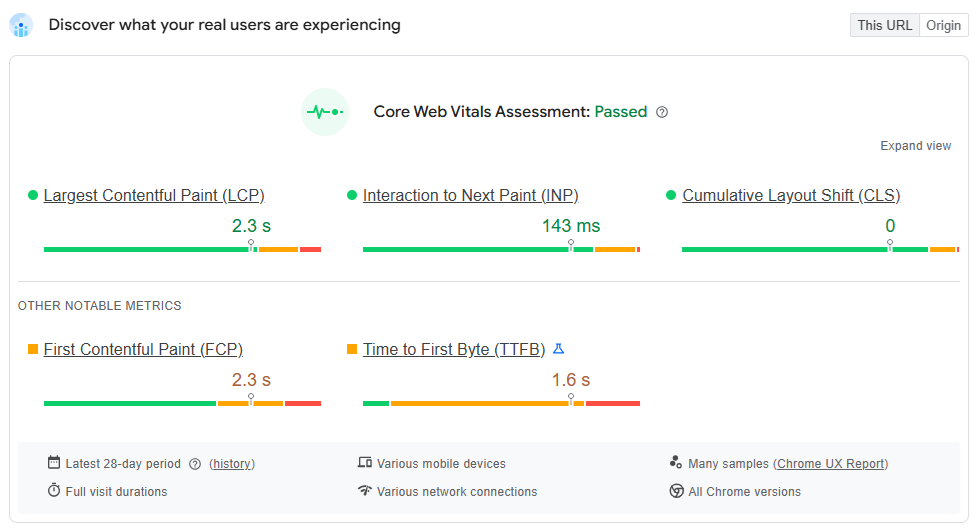
The aim is to land on a plugin that’s powerful but still light on its feet. SEOPress is designed with that balance in mind: fast, unobtrusive, and free from ads or distracting admin clutter, so you get the SEO features you actually need. It’s widely regarded as one of the quickest full-featured options out there. “It’s fast, white label and provides all the basics and advanced features to perform.” – Aurelian, SEOPress user.
Friction test 2: What is the true cost?
The price tag you see upfront rarely reflects the full expense. The real test is how much financial friction shows up months or even years down the line. Many SEO plugins lean on pricing models that start out looking affordable but quickly add up. For agencies and developers managing multiple client sites, that creep can become a real burden.
⚠️ Hidden costs to watch for:
- Per-site licensing: The most common trap. That tempting $50/year turns into $1,000/year once you’re covering 20 sites. It’s a model that actively penalizes growth.
- Feature paywalls: The “free” version may get you in the door, but crucial tools like redirect managers, schema markup, or WooCommerce integration sit behind paid upgrades. You often only discover this after you’ve sunk time into setup.
- Renewal price hikes: Many vendors hook you with a steep first-year discount, only to double or triple the fee when renewal comes around. They’re banking on the fact that switching will feel too painful.
The smarter move is to choose transparent, predictable pricing with unlimited site licenses. That way, you and your clients have costs you can plan for, without being punished for scaling. SEOPress stands out here. With SEOPress PRO, every premium feature is included across 1, 5 or unlimited sites for one steady annual fee. Agencies can roll it out to all their clients without costs spiraling. And when SEOPress adjusted pricing recently, existing customers kept their original rates – a clear sign of the commitment to long-term predictability you can rely on to grow your business.
Friction test 3: Do you have a clean escape route?
Nobody installs a plugin while thinking about the day they’ll walk away from it. But business priorities shift, and the best step is making sure you’re not boxed in later. This last test is about protecting yourself from lock-in. Some plugins keep your SEO data – titles, descriptions, redirects, etc. – tied up in their own proprietary formats. When you try to move, you suddenly realize years of careful optimization are stuck. Your data becomes leverage to keep you paying.
✅ What a clean escape looks like:
- Easy import/export tools: One-click migration of settings and metadata from other plugins shows real confidence. If they welcome fair comparison, it’s a good sign.
- Standard data storage: Key SEO fields should use standard WordPress fields wherever possible, so your work lives on even if the plugin doesn’t.
- Clean uninstall option: A proper uninstall should clear out its data and database tables, leaving your site neat and untouched.
SEOPress is built on the principle that your data is yours. Its one-click migration tool pulls in content from Yoast and other top plugins without fuss, and exporting is just as straightforward. That means you stay in control, with no locked-up data, wasted effort, or friction.
Applying the framework: 3 SEO plugin choices
Now that you’ve got the friction framework, the path forward is much easier to see.
1. SEOPress: For agencies and professionals needing predictable costs
SEOPress is a freemium WordPress SEO plugin that offers unlimited site licensing and the ability to import data from ten competing plugins.
Who it’s for: Agency owners, WordPress developers, and growth-driven businesses. If you manage multiple sites (or plan to), this one can be great for you. The white-label feature is especially useful for agencies working with clients:
- Client professionalism: Deliver a clean, polished backend with no third-party branding, ads, or distracting upsells.
- Efficiency: You can skip the “what’s SEOPress?” questions and move to straightforward SEO management.
Why it’s the low-friction choice: SEOPress clears hurdles at every stage. On cost, it wins hands down with simple, predictable pricing. On performance, it’s lightweight and fast. On migration, the built-in tools mean you’ve always got a smooth exit plan. In short, you’re getting a professional-grade toolkit without the headaches of inflated costs or performance compromises.
2. The SEO Framework: For the dedicated minimalist

The SEO Framework keeps things lean. It’s built for speed, not bells and whistles, and relies on an extension-based setup.
Who it’s for: Developers or solo creators who value a fast, unopinionated experience where extensions do the heavy lifting.
How it fits the framework: This plugin passes the performance friction test with ease – it’s lightweight, efficient, and barely noticeable once running. If you want a near-invisible UI that won’t distract you, it’s a strong option. The flip side? To unlock a full suite of features, you’ll need paid extensions, and the pared-back interface can be confusing for beginners looking for more direction.
3. Yoast: For teams requiring extensive documentation

Yoast SEO has long been the market leader and comes with the largest library of third-party tutorials. Licensing is per site.
Who it’s for: Larger organizations or teams that put a premium on detailed documentation and the reassurance of a long-established product.
How it fits the framework: Yoast’s strength lies in its ecosystem, with an unrivalled amount of tutorials, community knowledge, and a long market history. But that comes with friction. The per-site licensing quickly becomes costly for anyone managing multiple websites, and its long development history adds code bloat, which impacts performance. It’s still the industry benchmark, but not always the most efficient option for modern agencies.
Is SEOPress better than Yoast?
SEOPress charges $149 per year for unlimited sites, compared with Yoast’s $118.80 per site. For agencies managing multiple properties, SEOPress is the more cost-effective choice.
| Feature / Scenario | SEOPress PRO | Yoast SEO Premium | The SEO Framework |
| Pricing Model | Tiered (by site count) | Per-Site License | Tiered (by site count) |
| Cost for 1 Site | $49 | $118.80 | $84 (Pro) |
| Cost for 5 Sites | $59 | $594 | $204 (Business Plan) |
| Cost for 10 Sites | $149 (Unlimited) | $1,188 | $204 (Business Plan) |
| Cost for 20 Sites | $149 (Unlimited) | $2,376 | $204 (Business Plan) |
| Best For | Agencies & professionals needing predictable, low-cost scaling | Single-site owners who prioritize the Yoast ecosystem over cost | Users wanting a strong free option or those whose site count fits its specific tiers |
The numbers tell the story. For anyone managing multiple sites, the friction framework makes the choice clear: SEOPress delivers professional features without the professional price tag.
Choosing the path of least friction
Ask yourself three simple questions – Will it slow my site? What’s the real cost? Can I walk away easily? – and you’ll shift from decision fatigue to confident clarity.
This framework strips away the marketing noise and spotlights what matters most. Run any plugin through these tests, and the “best” choice reveals itself. It’s the one that fits your business model instead of fighting against it. For agencies juggling multiple sites, freelancers managing varied clients, or businesses planning for scale, the numbers tell the story. Less friction means a clearer way forward.
That’s exactly why we built SEOPress – a powerful, fast, and affordable solution that respects you and your data.
No compromises on speed, no hidden pricing jumps, no vendor lock-in. Just a complete toolkit designed to deliver results without the friction.
Ready to cut the friction out of your SEO workflow?
Frequently asked questions (FAQs)
Is WordPress really better for SEO?
Yes, WordPress is a strong choice for SEO straight out of the box. Its clean site structure, flexible permalinks, and user-friendly content management make it easy for search engines to understand and index your site. The real advantage, though, comes when you pair it with a robust SEO plugin. Tools like SEOPress let you fine-tune vital elements such as title tags, meta descriptions, sitemaps, and structured data without touching code. In short, WordPress gives you the foundation, and a good plugin takes it to the next level.
Are SEO plugins worth the spend?
Here’s how the numbers stack up for five sites over three months: Yoast SEO Premium:
- Annual Cost: $118.80 per site × 5 sites = $594.00.
- 3-Month Cost: $594.00 ÷ 4 = $148.50.
SEOPress PRO (5 Site Plan):
- Annual Cost: $59.00.
- 3-Month Cost: $59.00 ÷ 4 = $14.75.
Result: Managing five sites with SEOPress saves you more than $130 in just three months. Scale that up to 20 sites, and the savings are transformative.


